How to Encrypt a File Over 100GB
1. Background
While learning reactive programming recently, I came across a news story on Zhihu about someone losing their iCloud data. This got me thinking - could I periodically export my iCloud data, encrypt it, and back it up to some cloud storage? After some research, I found Bouncy Castle.
Bouncy Castle is an open-source encryption and cryptography library designed to provide secure programming tools for Java and C# developers. It offers a range of cryptographic algorithms, protocols, and tools, including symmetric encryption, asymmetric encryption, digital signatures, message digests, certificate operations, and more.
However, BC encryption code appears to be single-threaded. While it works fine for small files, encrypting large files causes memory overflow.
So, can we use reactive programming to encrypt a large file in segments? For decryption, we simply reverse the process - decrypt the encrypted content in segments and write them to the same file in order.
2. How to Do It
I remembered playing with RandomAccessFile when writing netty before, which can split a file into multiple ChunkFiles. This memory comes from working on peer-to-peer file transfer at a company years ago.
So using RandomAccessFile to read a single file as multiple ChunkFiles, then encrypting them and converting to base64 encoding completes the encryption step.
This is the main process. Using the reactive programming framework project-reactor makes it more convenient to handle multiple thread tasks, encrypting different ChunkFiles and finally writing them to a file in order. Since converting byte arrays to base64 encoding increases the final file size by about 1.x times, we can add a compression method for base64-encoded text to reduce file size.
Wow, just thinking about it is interesting~~(self-perception)~~. This way, all private files can be processed like this, even uploaded to Notion, which supports unlimited storage, though it limits single files to 5GB. We can solve this too - just split the file when writing, limiting the size of each split file.
The code in the following sections can be found in my github. You can directly use the encryptBigFile method in CipherUtilTest to try simple functionality. This class contains unit tests for all features - try encrypting a file and then restoring it.
2.1 Results
20GB File Encryption:
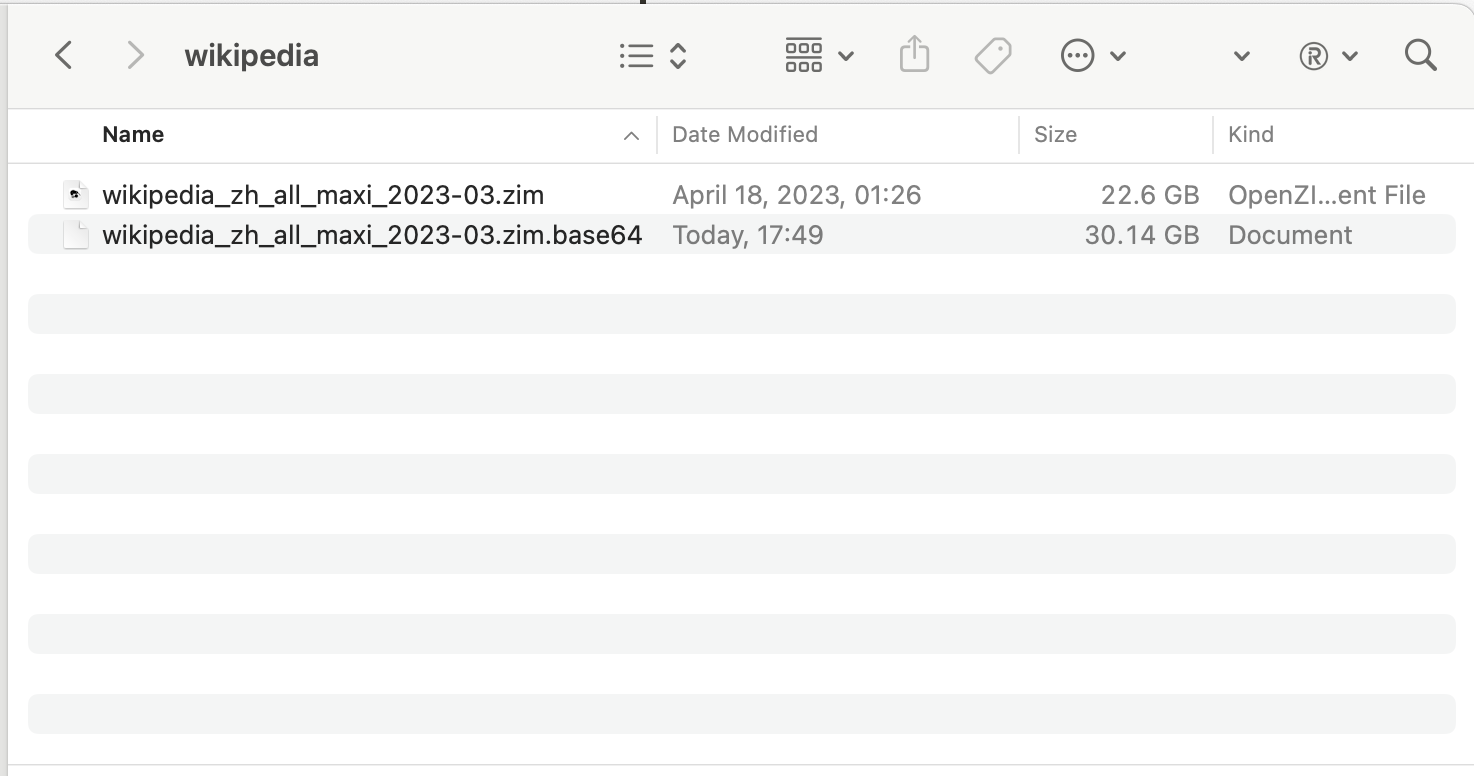
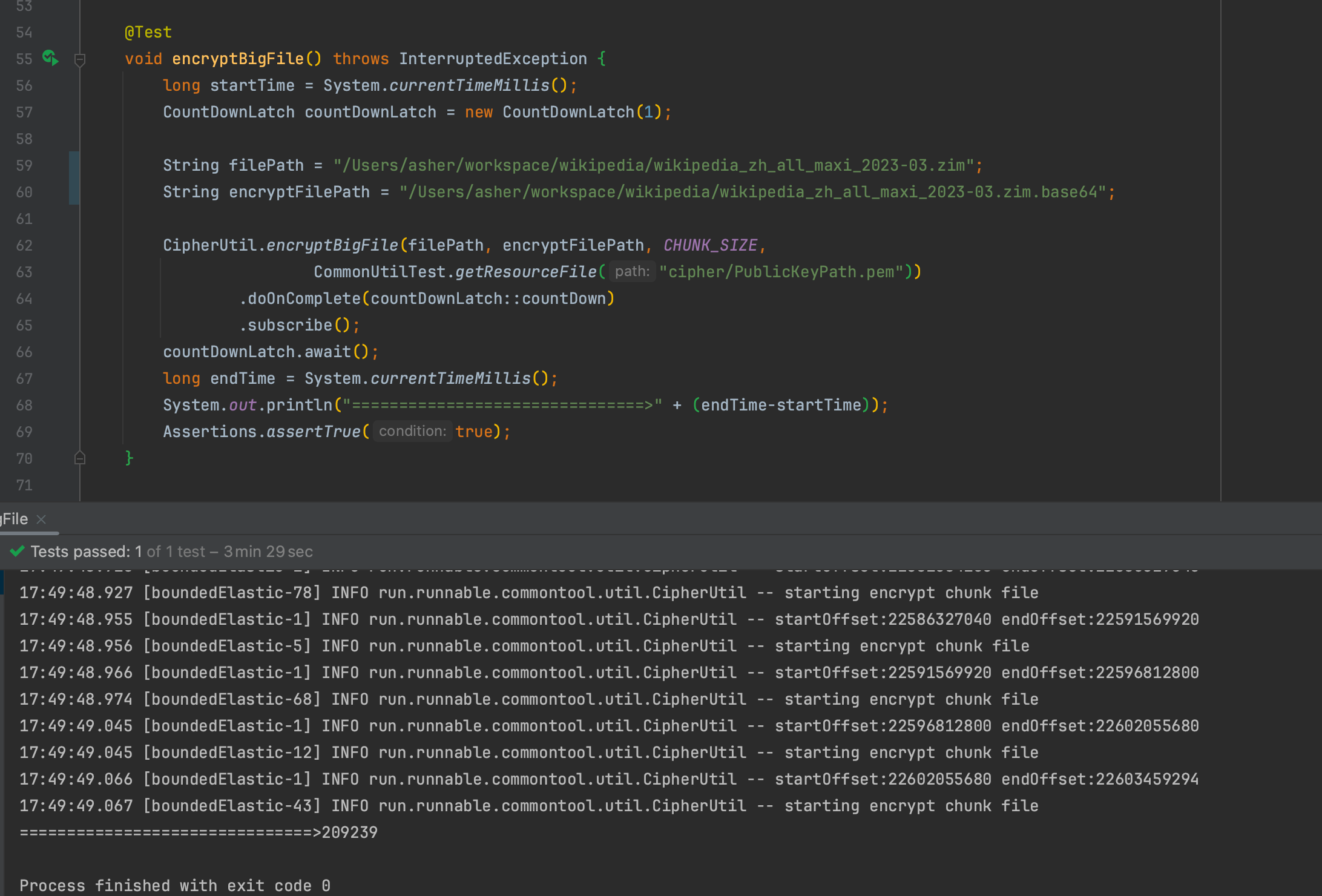
Encrypting a 22GB Wikipedia archive file with 5MB per ChunkFile
Time: 209.239 seconds = 3 minutes 29 seconds
The encrypted content converted to base64 (without compression) is 30GB, about 1.33x larger
20GB File Decryption:
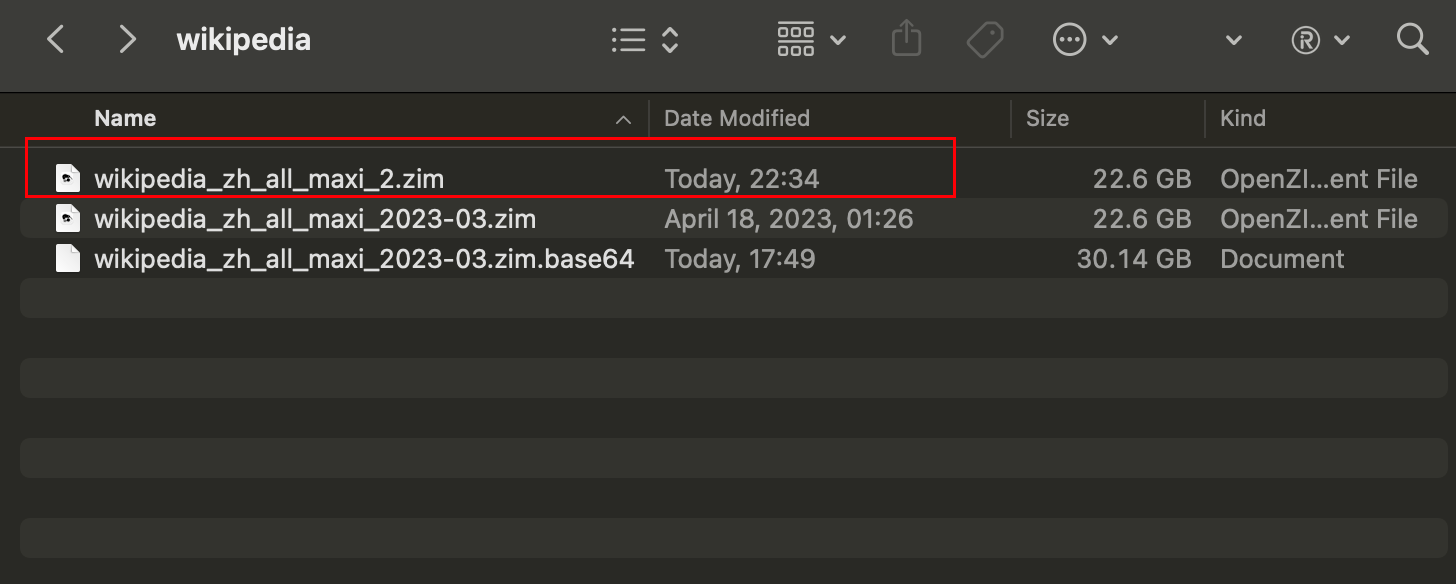
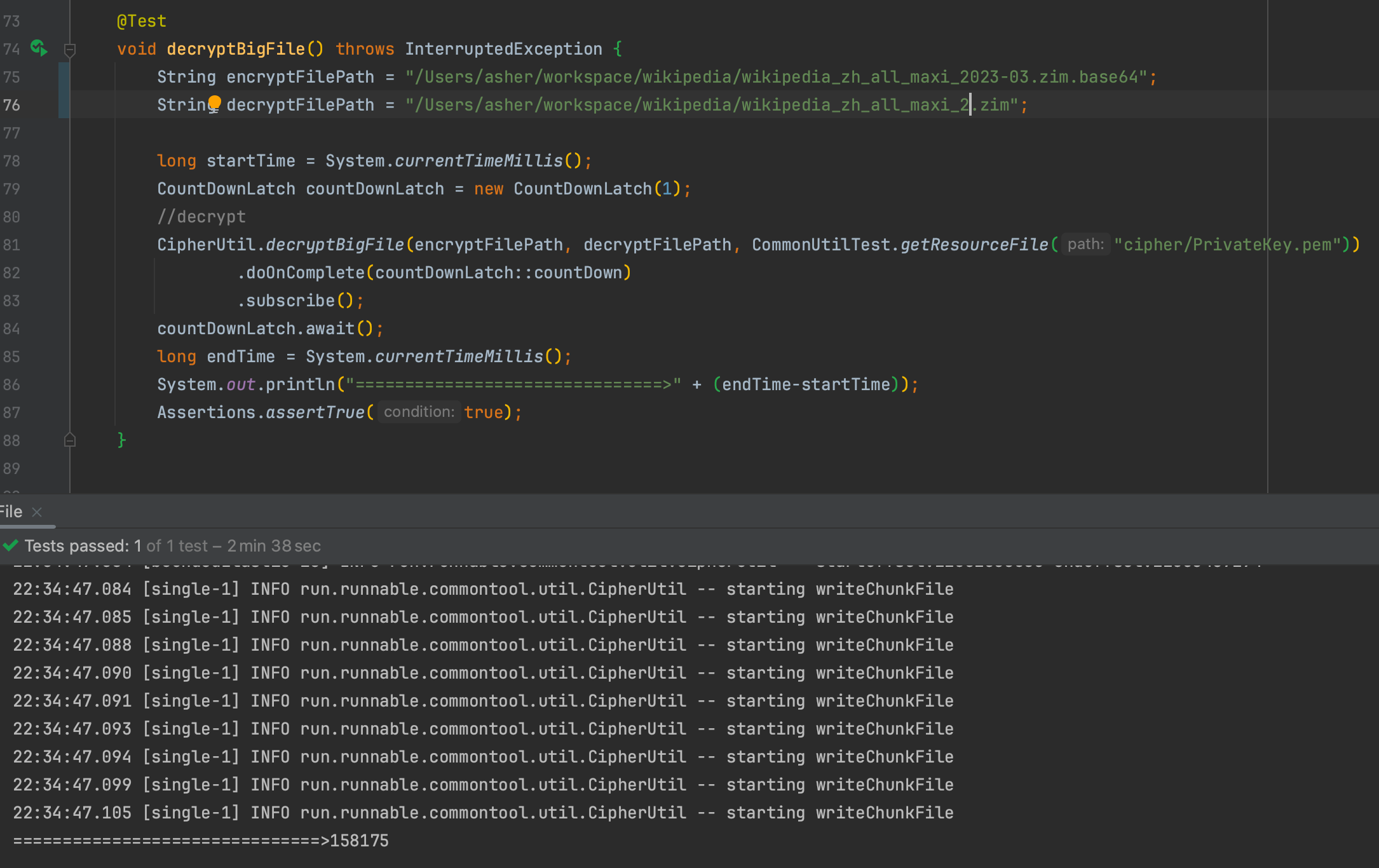
Decrypting the 30GB encrypted file and generating a new file
Time: 158.175 seconds = 2 minutes 38 seconds
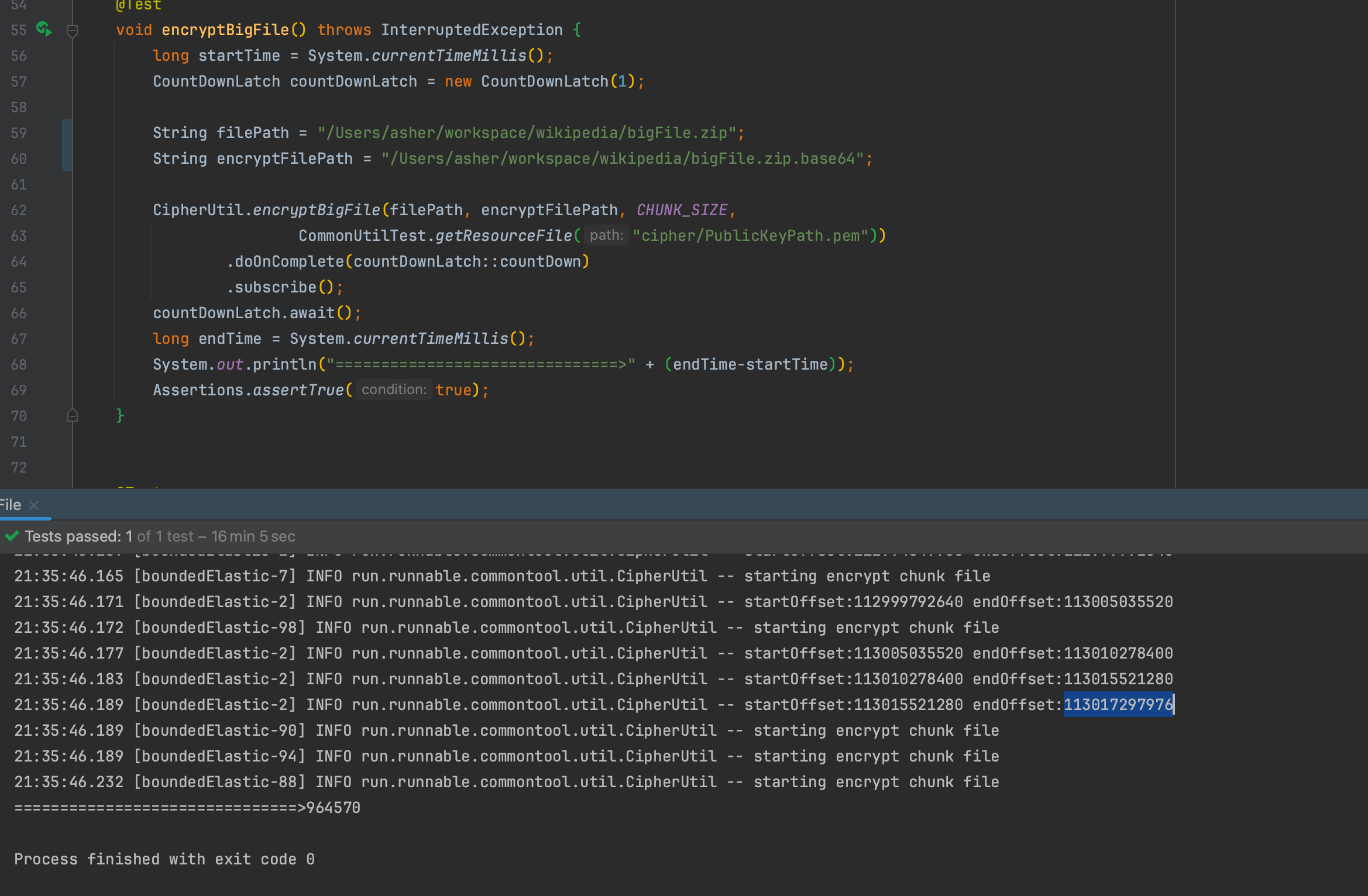
100GB File Encryption
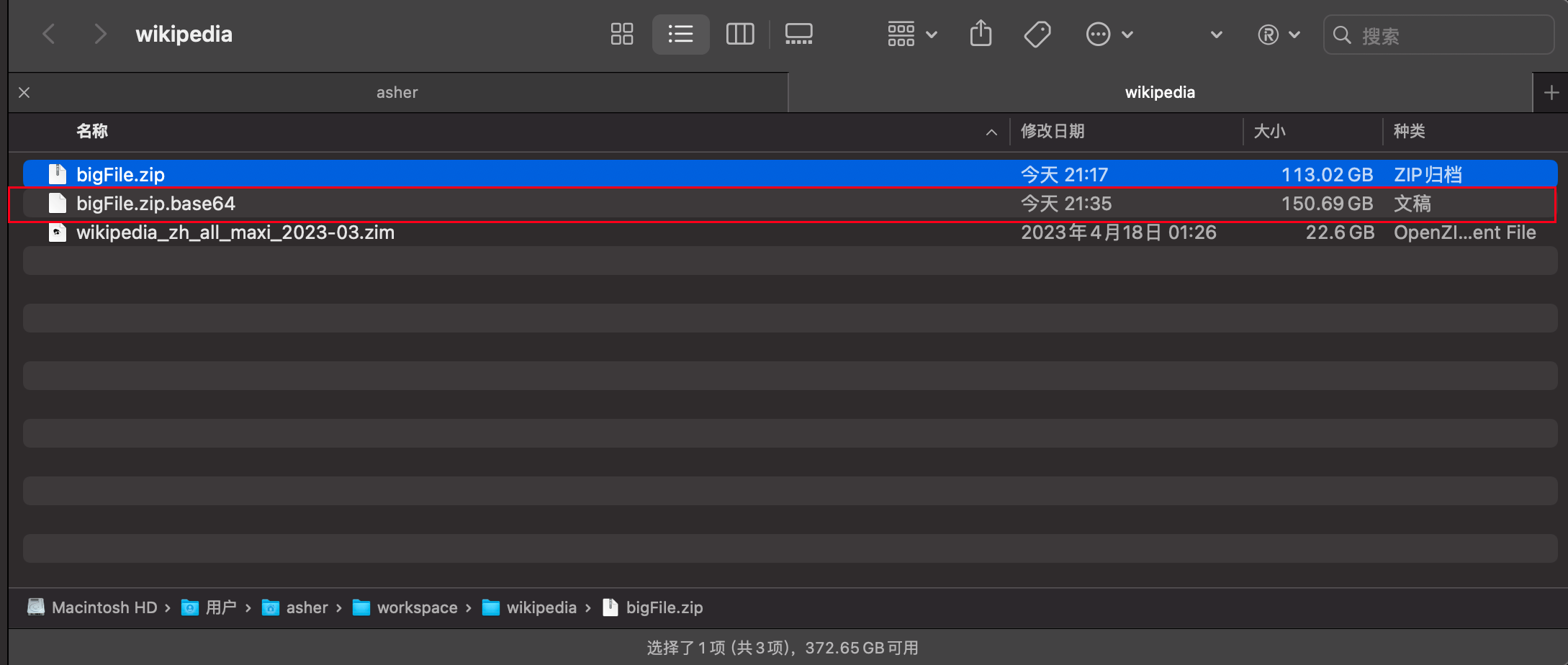
Encrypting a 113GB Wikipedia archive file with 5MB per ChunkFile
Time: 964.570 seconds = 16 minutes 4 seconds
The encrypted content converted to base64 (without compression) is 150.69GB, still about 1.33x larger
100GB File Decryption
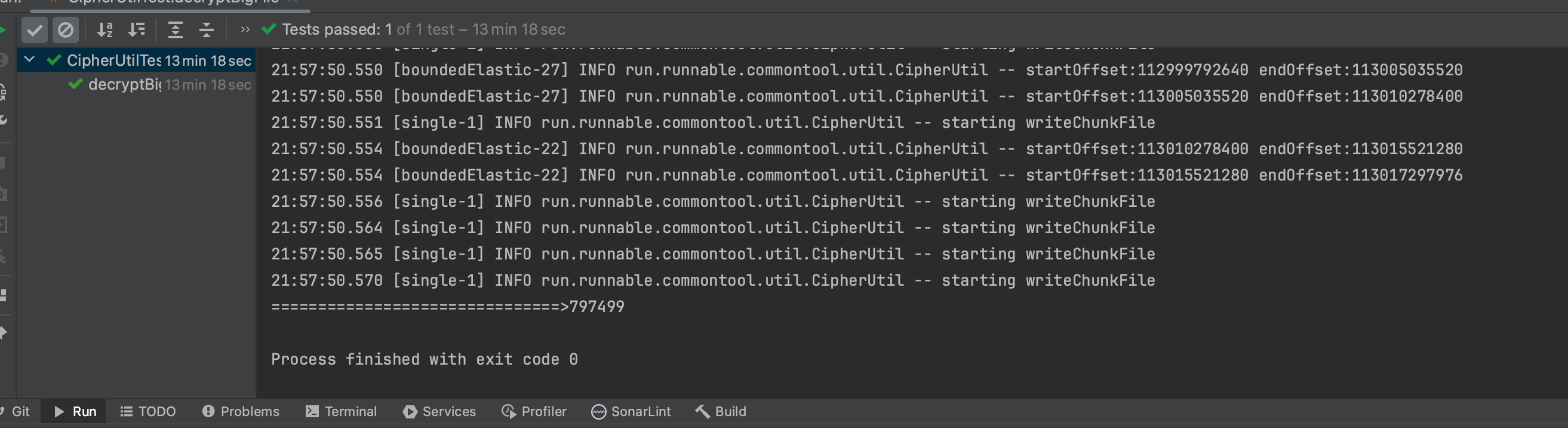
Decrypting the 150.69GB encrypted file and generating a new file
Time: 797.499 seconds = 13 minutes 17 seconds
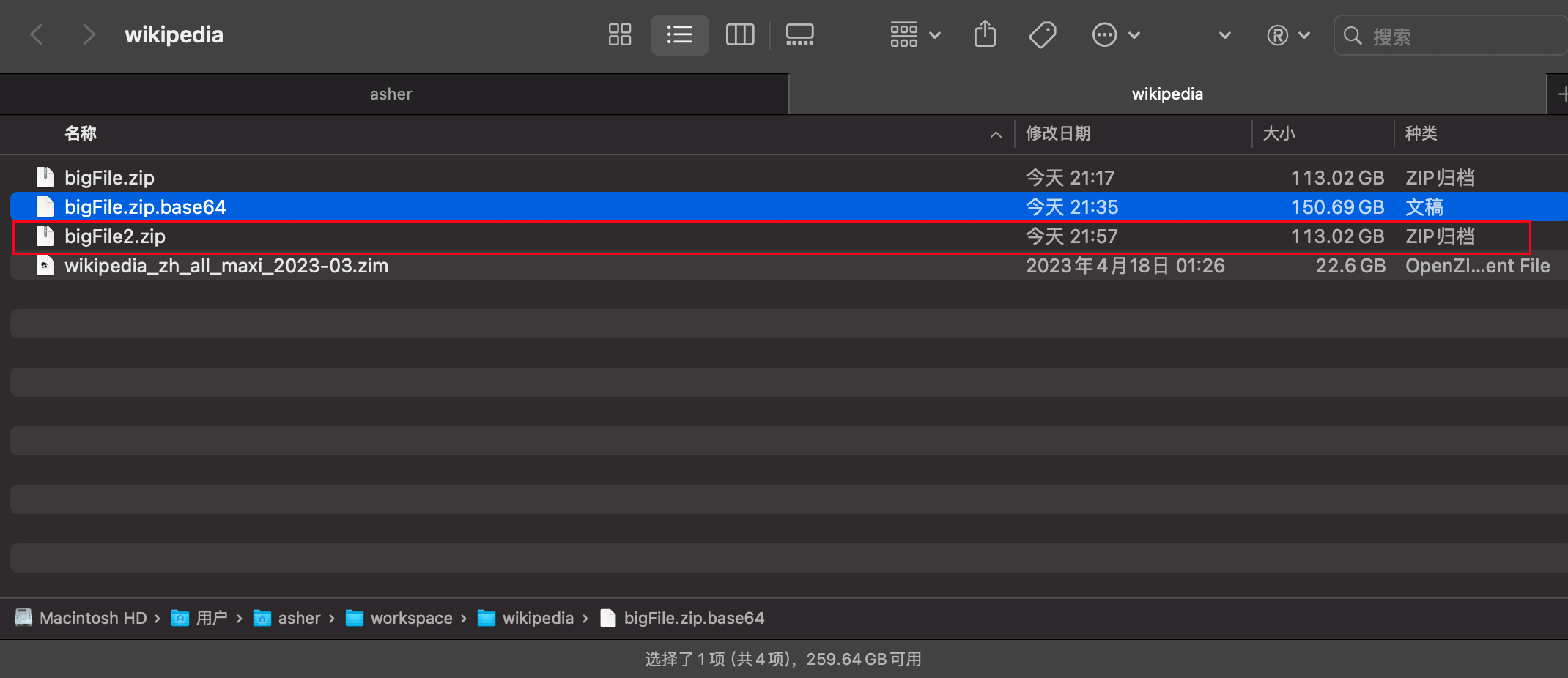
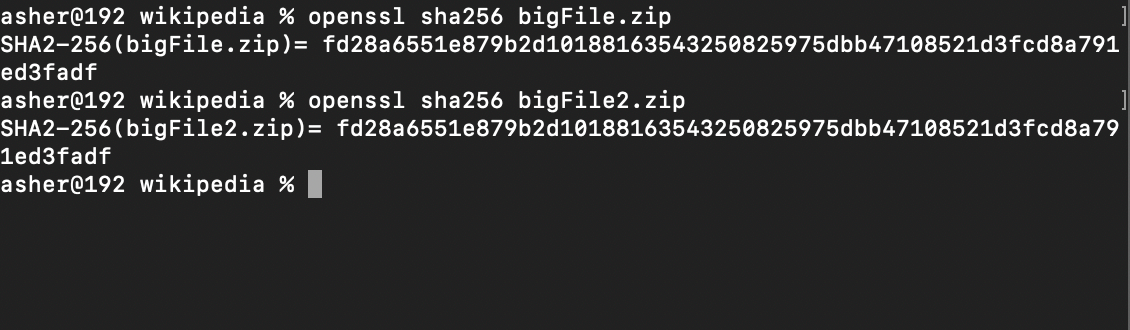
The decrypted file has the same hash256 as the original, so decryption works correctly
3. Playing with Bouncy Castle First
The Bouncy Castle library supports many common cryptographic algorithms, including AES, DES, RSA, DSA, ECDSA, etc. It also supports various cipher modes like CBC, ECB, GCM, etc. Additionally, Bouncy Castle provides functionality for handling digital certificates and key management, including X.509 certificate generation and verification, PKCS#12 format reading and writing, and key generation and storage. One of the Bouncy Castle library's design goals is to provide an easy-to-use API to simplify the complexity of cryptographic operations. It provides object-oriented interfaces and offers higher-level abstractions than the JDK itself in many aspects. This allows developers to use cryptographic functionality more easily without delving into complex underlying details.
Here I chose the ECC algorithm for asymmetric encryption because asymmetric encryption has higher security - the public key is public, the private key is kept by yourself, and you don't need to give the private key to others.
Compared to RSA, it can provide shorter key lengths at the same security level, reducing computational and storage resource requirements.
3.1 Code Section
The latest version of the Bouncy Castle Crypto library can be found on mvn repository
https://mvnrepository.com/artifact/org.bouncycastle/bcprov-jdk18on
Add dependency:
<dependency>
    <groupId>org.bouncycastle</groupId>
    <artifactId>bcprov-jdk18on</artifactId>
    <version>1.76</version>
</dependency>
Let's start with something simple. This method uses the encryption implementation provided by Bouncy Castle Provider. It generates an elliptic curve key pair (public and private keys) and saves them to specified file paths. Then it initializes the encryptor with the public key and configures it with ECIES parameters. Finally, it encrypts the content and returns the encrypted result.
byte[] derivation = Hex.decode("202122232425263738393a3b3c3d3e3f");
byte[] encoding   = Hex.decode("303132333435362728292a2b2c2d2e2f");

/**
 * Encrypt by Elliptic Curve Crypt
 *
 * @param encryptContent     content to encrypt
 * @param curveName          curve name, e.g.:
 *                           secp256k1: widely used in cryptocurrencies like Bitcoin and Ethereum. 256-bit length with good security and performance.
 *                           secp256r1/prime256v1: common elliptic curve parameter, also known as NIST P-256. Widely used in many security protocols and applications.
 *                           secp384r1: also known as NIST P-384, 384-bit length providing higher security than secp256k1 and secp256r1, but may slightly reduce performance.
 *                           secp521r1: also known as NIST P-521, 521-bit length providing the highest level of security, but may sacrifice some performance.
 * @param transformation     transformation: ECIES (Elliptic Curve Integrated Encryption Scheme)
 * @param savePrivateKeyPath path to save private key
 * @param savePublicKeyPath  path to save public key
 * @return {@link byte[]}
 */
@SneakyThrows
static byte[] encryptByECC(byte[] encryptContent,
                           String curveName,
                           String transformation,
                           String savePrivateKeyPath,
                           String savePublicKeyPath) {
    Security.addProvider(new BouncyCastleProvider());

    KeyPairGenerator keyPairGenerator = KeyPairGenerator.getInstance("EC", "BC");
    keyPairGenerator.initialize(ECNamedCurveTable.getParameterSpec(curveName));

    KeyPair keyPair = keyPairGenerator.generateKeyPair();

    final PrivateKey privateKey = keyPair.getPrivate();
    final PublicKey publicKey = keyPair.getPublic();
    savePrivateKey(privateKey, savePrivateKeyPath);
    savePublicKey(publicKey, savePublicKeyPath);

    // Encrypt using public key
    IESParameterSpec params = new IESParameterSpec(derivation, encoding, 128, 128, null);
    Cipher encryptCipher = Cipher.getInstance(transformation, "BC");
    encryptCipher.init(Cipher.ENCRYPT_MODE, publicKey, params);

    return encryptCipher.doFinal(encryptContent);
}

/**
 * Save public key
 *
 * @param publicKey public key
 * @param filePath
 */
public static void savePublicKey(PublicKey publicKey, String filePath) {
    X509EncodedKeySpec x509EncodedKeySpec = new X509EncodedKeySpec(publicKey.getEncoded());
    saveToFile(filePath, x509EncodedKeySpec.getEncoded());
}

/**
 * Save private key
 *
 * @param privateKey
 * @param filePath   file path
 */
public static void savePrivateKey(PrivateKey privateKey, String filePath) {
    PKCS8EncodedKeySpec pkcs8EncodedKeySpec = new PKCS8EncodedKeySpec(privateKey.getEncoded());
    saveToFile(filePath, pkcs8EncodedKeySpec.getEncoded());
}
How to use it?
Encrypting a string:
@Test
void encryptByECC() throws IOException {
    String password = "p@ssW0rd";
    final byte[] bytes = CipherUtil.encryptByECC(password.getBytes(),
            "secp256k1",
            "ECIES",
            "PrivateKey.pem",
            "PublicKeyPath.pem");
    FileUtil.writeBytesToFile(bytes, "password.enc");
    Assertions.assertNotNull(bytes);
}
The above code uses Elliptic Curve Cryptography (ECC) to encrypt a password and saves the encrypted result to a file.
Code logic:
- Define a password string
passwordto be encrypted. - Call
CipherUtil.encryptByECCmethod with these parameters:
password.getBytes(): Convert password string to byte array as content to encrypt."secp256k1": Specify the elliptic curve name, using secp256k1 curve."ECIES": Specify encryption scheme, using ECIES (Elliptic Curve Integrated Encryption Scheme)."PrivateKey.pem": Specify file path to save private key."PublicKeyPath.pem": Specify file path to save public key. TheCipherUtil.encryptByECCmethod encrypts the password and returns the encrypted byte array.
4. Using project reactor + RandomAccessFile
With the encryption method ready, the next part is: read any file, split it into multiple chunk files, encrypt each chunk's byte array, then convert the encrypted byte array to base64.
First, we need to know which file to read:
Mono.just(filePath)
    .map(FileUtil::newRandomAccessFile).flux()
After reading, split this file into multiple ChunkedFiles. Here we use Flux.create to emit elements.
chunkSize is usually in bytes, so to read 4MB at a time: chunkSize=1024 * 1024 * 4
/**
 * Split a file into multiple files of specified size
 *
 * @param file      file
 * @param chunkSize chunkSize
 * @return {@link Flux}<{@link ChunkFileInfo}>
 */
static Flux<ChunkFileInfo> split2ChunkedFiles(RandomAccessFile file, int chunkSize) {
    return Flux.create(emitter -> {
        try {
            // Get file's FileChannel for reading content
            FileChannel channel = file.getChannel();

            // Get total file size
            long fileSize = channel.size();
            long currentPosition = 0;

            while (currentPosition < fileSize ){

                while (emitter.requestedFromDownstream() == 0 && !emitter.isCancelled()) {
                    // Wait when no downstream request and not cancelled
                }

                // Calculate remaining file size
                long remainingSize = fileSize - currentPosition;
                // Calculate read size for each chunk, minimum of remaining size and specified chunk size
                int readSize = (int) Math.min(remainingSize, chunkSize);

                // Create byte buffer for reading file content
                ByteBuffer buffer = ByteBuffer.allocate(readSize);
                // Read data from file channel to buffer
                channel.read(buffer, currentPosition);

                byte[] byteArray = new byte[readSize];
                // Reset buffer position and limit for reading data
                buffer.flip();
                buffer.get(byteArray);
                // Emit next chunk info to subscriber
                emitter.next(new ChunkFileInfo(currentPosition, currentPosition + readSize, readSize, byteArray));
                // Update current position to continue reading next chunk
                currentPosition += readSize;
            }
            emitter.complete();
        } catch (IOException e) {
            emitter.error(e);
        }
    });
}

/**
 * @author Asher
 */
@AllArgsConstructor
@NoArgsConstructor
@Getter
@Setter
class ChunkFileInfo {

    private long startOffset;
    private long endOffset;
    private int chunkSize;

    private byte[] bytes;

}
Combining the previous code:
Mono.just(filePath)
    .map(FileUtil::newRandomAccessFile).flux()
    .flatMap(file -> split2ChunkedFiles(file, chunkSize).limitRate(8))
Why add .limitRate(8) at the end? To prevent flatMap from loading the entire file at once when subscribing to the inner stream, which would cause memory overflow.
Next, encrypt the generated chunkedFile and convert to base64:
long startOffset = chunkedFile.getStartOffset();
long endOffset = chunkedFile.getEndOffset();
return Mono.just(chunkedFile.getBytes())
        .map(chunkByte -> encryptByECC(chunkByte, "secp256k1", "ECIES", publicKey, "EC"))
        .map(encryptBytes -> Base64.getEncoder().encodeToString(encryptBytes))
        .map(base64 -> startOffset + ":" + endOffset + ":" +  base64)
        ;
encryptByECCis the encryption method from the previous section- The final generated text includes this
chunkedFile's startOffset and endOffset, needed for file restoration to write at the same position.
4.1 Complete Code
import lombok.SneakyThrows;
import lombok.extern.slf4j.Slf4j;
import org.apache.commons.io.FileUtils;
import org.bouncycastle.jce.ECNamedCurveTable;
import org.bouncycastle.jce.provider.BouncyCastleProvider;
import org.bouncycastle.jce.spec.IESParameterSpec;
import org.bouncycastle.util.encoders.Hex;
import org.slf4j.Logger;
import org.slf4j.LoggerFactory;
import reactor.core.publisher.Flux;
import reactor.core.publisher.Mono;
import reactor.core.scheduler.Schedulers;
import run.runnable.commontool.entity.ChunkFileInfo;

import javax.crypto.Cipher;
import java.io.File;
import java.io.FileInputStream;
import java.io.IOException;
import java.io.RandomAccessFile;
import java.security.*;
import java.security.spec.PKCS8EncodedKeySpec;
import java.security.spec.X509EncodedKeySpec;
import java.util.Base64;

static Flux<Void> encryptBigFile(String filePath, String targetFilePath, int chunkSize, File publicKey){
    return Mono.just(filePath)
            .doFirst(deleteFile(targetFilePath))
            .map(FileUtil::newRandomAccessFile).flux()
            .flatMap(file -> split2ChunkedFiles(file, chunkSize).limitRate(8))
            .doOnNext(it -> log.info("startOffset:{} endOffset:{}", it.getStartOffset(), it.getEndOffset()))
            .flatMapSequential(chunkedFile -> {
                long startOffset = chunkedFile.getStartOffset();
                long endOffset = chunkedFile.getEndOffset();
                return Mono.just(chunkedFile.getBytes())
                        .publishOn(Schedulers.boundedElastic())
                        .flux()
                        .doOnNext(it -> log.info("starting encrypt chunk file"))
                        .map(chunkByte -> encryptByECC(chunkByte, "secp256k1", "ECIES", publicKey, "EC"))
                        .map(encryptBytes -> Base64.getEncoder().encodeToString(encryptBytes))
                        .map(base64 -> startOffset + ":" + endOffset + ":" +  base64)
                        ;
            })
            .concatMap(content -> appendToFile(targetFilePath, content));
}

@SneakyThrows
static RandomAccessFile newRandomAccessFile(String path) {
    return new RandomAccessFile(path, "r");
}

/**
 * Split a file into multiple files of specified size
 *
 * @param file      file
 * @param chunkSize chunkSize
 * @return {@link Flux}<{@link ChunkFileInfo}>
 */
static Flux<ChunkFileInfo> split2ChunkedFiles(RandomAccessFile file, int chunkSize) {
    return Flux.create(emitter -> {
        try {
            FileChannel channel = file.getChannel();
            long fileSize = channel.size();
            long currentPosition = 0;

            while (currentPosition < fileSize ){

                while (emitter.requestedFromDownstream() == 0 && !emitter.isCancelled()) {
                    //waiting request
                }

                long remainingSize = fileSize - currentPosition;
                int readSize = (int) Math.min(remainingSize, chunkSize);

                ByteBuffer buffer = ByteBuffer.allocate(readSize);
                channel.read(buffer, currentPosition);

                byte[] byteArray = new byte[readSize];
                buffer.flip();
                buffer.get(byteArray);
                emitter.next(new ChunkFileInfo(currentPosition, currentPosition + readSize, readSize, byteArray));
                currentPosition += readSize;
            }
            emitter.complete();
        } catch (IOException e) {
            emitter.error(e);
        }
    });
}
5. Restoring Encrypted Files
After file encryption, we can restore through the reverse process: read text content → base64 decode → decrypt byte array → write to new file
Since we're using reactive programming, we can read text content like this:
static Flux<String> readLines(String path){
    return Flux.using(
            () -> Files.lines(Path.of(path)),
            Flux::fromStream,
            BaseStream::close
    );
}
Using Flux.using for text reading makes the code more concise, with fluent style and avoiding side-effects.
Base64 decoding is just one line of code. For decrypting byte arrays, the method is already encapsulated:
/**
 * Decrypt by Elliptic Curve Crypt
 *
 * @param decryptContent content to decrypt
 * @param privateKey     private key
 * @param transformation transformation
 * @return {@link byte[]}
 */
@SneakyThrows
static byte[] decryptByEllipticCurveCrypt(byte[] decryptContent,
                                  PrivateKey privateKey,
                                  String transformation){
    // Decrypt using private key
    Cipher decryptCipher = Cipher.getInstance(transformation, "BC");
    IESParameterSpec params = new IESParameterSpec(derivation, encoding, 128, 128, null);
    decryptCipher.init(Cipher.DECRYPT_MODE, privateKey, params);

    return decryptCipher.doFinal(decryptContent);
}
Pass in the decryptContent to decrypt, the private key file, and the transformation used during encryption. It returns the decrypted byte array.
5.1 Complete Code:
/**
 * Decrypt the file encrypted by the encryptBigFile method and
 * restore it to the same file
 *
 * @param encryptFilePath encryptFilePath
 * @param targetFilePath  targetFilePath
 * @param privateKey  privateKey
 * @return {@link Flux}<{@link Void}>
 */
static Flux<Void> decryptBigFile(String encryptFilePath, String targetFilePath, File privateKey){
    return Mono.just(encryptFilePath)
            .flux()
            .doFirst(deleteFile(targetFilePath))
            .flatMap(it -> FileUtil.readLines(it).limitRate(8))
            .buffer(4)
            .flatMapSequential(lines ->
                    Flux.fromIterable(lines)
                            .publishOn(Schedulers.boundedElastic())
                            .map(line -> decrypt2ChunkFileInfo(privateKey, line))
            )
            .doOnNext(it -> log.info("startOffset:{} endOffset:{}", it.getStartOffset(), it.getEndOffset()))
            .publishOn(Schedulers.single())
            .concatMap(chunkFileInfo -> {
                return Mono.just(chunkFileInfo)
                        .doOnNext(it -> mergeChunkFile(targetFilePath, it))
                        .then();
            });
}

/**
 * Read the contents of a file line by line, supporting backpressure
 *
 * @param path path
 * @return {@link Flux}<{@link String}>
 */
static Flux<String> readLines(String path){
    return Flux.using(
            () -> Files.lines(Path.of(path)),
            Flux::fromStream,
            BaseStream::close
    );
}

private static ChunkFileInfo decrypt2ChunkFileInfo(File privateKeyFile, String line) {
    String[] split = line.split(":");
    long startOffset = Long.parseLong(split[0]);
    long endOffset = Long.parseLong(split[1]);
    String base64Str = split[2];
    log.info("starting decode");
    byte[] decode = Base64.getDecoder().decode(base64Str);
    byte[] decryptByte = CipherUtil.decryptByEllipticCurveCrypt(decode, privateKeyFile, "EC", "ECIES");

    return new ChunkFileInfo(startOffset, endOffset, (int)(endOffset - startOffset), decryptByte);
}

@SneakyThrows
private static void mergeChunkFile(String decryptFilePath, ChunkFileInfo chunkFileInfo) {
    log.info("starting writeChunkFile");
    // Open file for append using "rw"
    try (RandomAccessFile mergedFile = new RandomAccessFile(decryptFilePath, "rw")){
        // Move the file pointer to the starting position
        mergedFile.seek(chunkFileInfo.getStartOffset());
        mergedFile.write(chunkFileInfo.getBytes(), 0, chunkFileInfo.getChunkSize());
    }
}

private static Runnable deleteFile(String filePath) {
    return () -> {
        try {
            File file = new File(filePath);
            if (file.exists()) {
                FileUtils.forceDelete(file);
            }
        } catch (IOException e) {
            throw new RuntimeException(e);
        }
    };
}
6. References
Advantages and Disadvantages of Symmetric vs Asymmetric Encryption Algorithms