How Long Has It Been Since You Watched the Stars? [Crawling All Pictures on NASA's Science Website]
1. Introduction
While surfing the Internet, I saw that the NASA Space Agency has a science website. There is a science picture every day, and it is very high-definition. I really want to download it as a wallpaper.
So I plan to write a Java crawler to crawl all the pictures. I can also add some notifications to check every night. When an update is detected, it will be pushed to the mobile phone when getting up the next morning. Of course, this function has not been implemented yet.
2. Development
2.1 Development Environment
- Maven
- Java 17 (To follow the trend after Spring Framework 6, I plan to use Zulu JDK17 for future development)
- WebMagic (Java crawler framework)
2.2 Maven pom.xml
<?xml version="1.0" encoding="UTF-8"?>
<project xmlns="http://maven.apache.org/POM/4.0.0"
         xmlns:xsi="http://www.w3.org/2001/XMLSchema-instance"
         xsi:schemaLocation="http://maven.apache.org/POM/4.0.0 http://maven.apache.org/xsd/maven-4.0.0.xsd">
    <modelVersion>4.0.0</modelVersion>

    <groupId>com.yeahvin</groupId>
    <artifactId>getStars</artifactId>
    <version>1.0.1-SNAPSHOT</version>

    <properties>
        <maven.compiler.source>17</maven.compiler.source>
        <maven.compiler.target>17</maven.compiler.target>
    </properties>

    <dependencies>
        <dependency>
            <groupId>us.codecraft</groupId>
            <artifactId>webmagic-core</artifactId>
            <version>0.7.5</version>
        </dependency>
        <dependency>
            <groupId>us.codecraft</groupId>
            <artifactId>webmagic-extension</artifactId>
            <version>0.7.5</version>
        </dependency>
        <dependency>
            <groupId>org.slf4j</groupId>
            <artifactId>slf4j-api</artifactId>
            <version>1.7.25</version>
        </dependency>
        <dependency>
            <groupId>org.projectlombok</groupId>
            <artifactId>lombok</artifactId>
            <version>1.18.20</version>
            <scope>provided</scope>
        </dependency>
        <dependency>
            <groupId>ch.qos.logback</groupId>
            <artifactId>logback-classic</artifactId>
            <version>1.2.3</version>
        </dependency>
    </dependencies>


    <build>
        <plugins>
            <plugin>
                <groupId>org.springframework.boot</groupId>
                <artifactId>spring-boot-maven-plugin</artifactId>
                <configuration>
                    <mainClass>com.yeahvin.StartApplication</mainClass>
                    <layout>ZIP</layout>
                </configuration>
                <executions>
                    <execution>
                        <goals>
                            <goal>repackage</goal>
                        </goals>
                    </execution>
                </executions>
            </plugin>
        </plugins>
    </build>
</project>
2.3 Use of Java Crawler WebMagic
This framework is also very easy to use. The official manual is here WebMagic in Action
For the use of this framework, here is a brief introduction. As shown in the figure below, what we developers need to do in the whole process is:
- Write PageProcessor
- Write Pipeline
You can complete a very simple crawler. I recommend you check out this example first: First Example
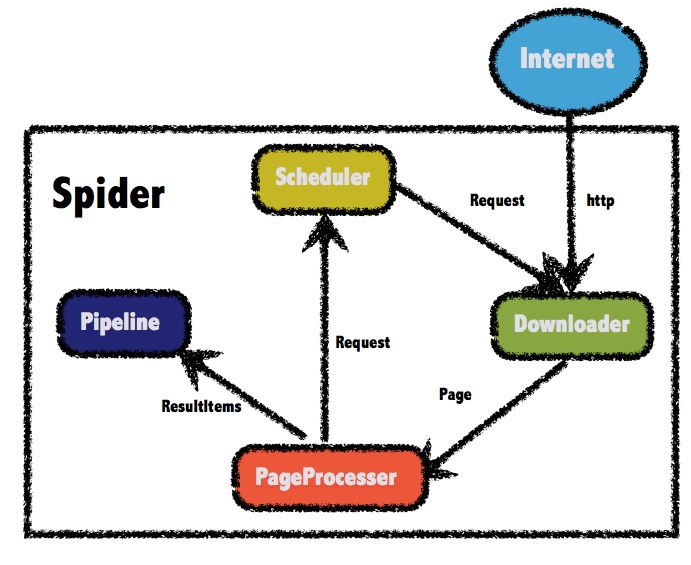
In this project, the analysis of the entire NASA website is actually very simple. The process is roughly
Request Overview Page --> Get all existing links and traverse --> Request detail page --> Download image
Startup Class
Ok, let's start developing. Write StartApplication, which is where the crawler starts.
package com.yeahvin;

import com.yeahvin.pageProcessors.NasaStarsProcessor;
import com.yeahvin.pipelines.NasaStarsPipeline;
import lombok.extern.slf4j.Slf4j;
import us.codecraft.webmagic.Spider;

/**
 * @author Asher
 * on 2021/11/6
 */
@Slf4j
public class StartApplication {

    // Download image storage path
    public static final String DOWNLOAD_PATH = "/Users/asher/gitWorkspace/temp/";
    public static final String INDEX_PATH = "https://apod.nasa.gov/apod/archivepix.html";

    public static void main(String[] args) {
        Spider.create(new NasaStarsProcessor())
                .addUrl(INDEX_PATH)
                .addPipeline(new NasaStarsPipeline())
                .run();
    }
}
In the above code, Spider.create(Processor) can build a crawler very quickly, then addUrl configures the requested address, addPipeline configures how to process the data when the crawler captures it, and finally run starts it.
Write NasaStarsProcessor
The reason for writing this is to analyze and process the content on the web page after requesting it.
package com.yeahvin.pageProcessors;

import com.yeahvin.StartApplication;
import com.yeahvin.utils.StringUtil;
import lombok.extern.slf4j.Slf4j;
import org.apache.commons.lang3.StringUtils;
import us.codecraft.webmagic.Page;
import us.codecraft.webmagic.Site;
import us.codecraft.webmagic.processor.PageProcessor;

import java.io.File;
import java.util.Arrays;
import java.util.List;
import java.util.Optional;
import java.util.regex.Pattern;
import java.util.stream.Collectors;

import static com.yeahvin.StartApplication.DOWNLOAD_PATH;

/**
 * @author Asher
 * on 2021/11/6
 */
@Slf4j
public class NasaStarsProcessor implements PageProcessor {

    private Site site = Site.me().setRetryTimes(5).setSleepTime(1000).setTimeOut(10000);

    @Override
    public void process(Page page) {
        if (page.getUrl().regex(StartApplication.INDEX_PATH).match()){

            // Get saved files in folder
            File saveDir = new File(DOWNLOAD_PATH);
            List<String> fileNames = Arrays.stream(Optional.ofNullable(saveDir.listFiles()).orElse(new File[]{}))
                    .map(File::getName)
                    .collect(Collectors.toList());

            log.info("Start crawling home page");
            List<String> starsInfos = page.getRawText()
                    .lines()
                    .map(line -> {
                        List<String> infoList = StringUtil.getRegexString(line, "^\\d{4}.*<br>$");
                        boolean flag = infoList.size() > 0;
                        return flag ? infoList.get(0) : null;
                    })
                    .filter(StringUtils::isNoneBlank)
                    .collect(Collectors.toList());

            starsInfos.forEach(info -> {
                String link = StringUtil.getRegexString(info, "ap.*html").get(0);
                String name = StringUtil.getRegexString(info, ">.*</a>").get(0)
                        .replace("</a>", "")