Restricting IP Login on Linux
When logging into the backend, I found the server had been attempted to login over 300 times. Unexpectedly, I found a simple method that actually works.
1. View Failed Login IPs and Times
lastb > temp.txt
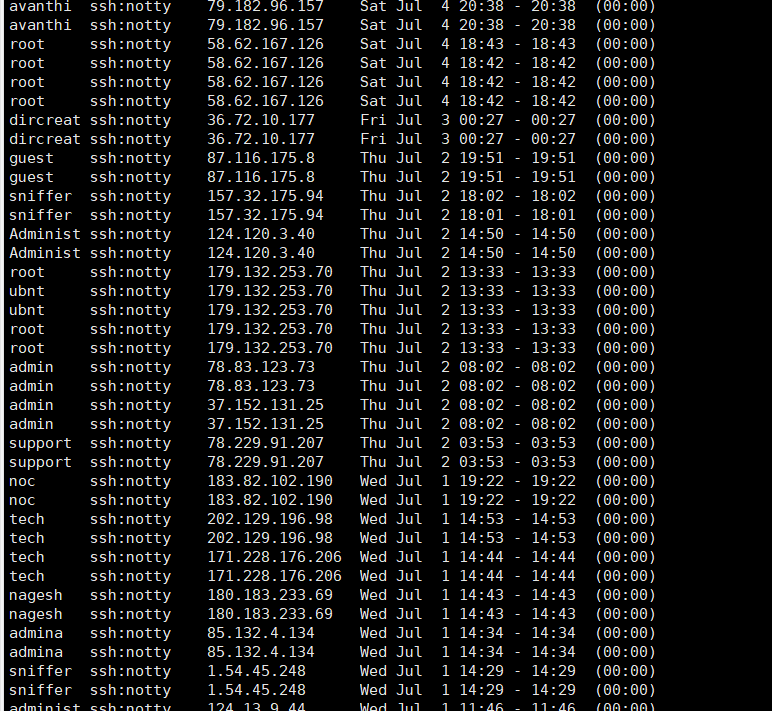
Quite a few people trying to cause trouble.
Then extract the IPs using regex:
Regular Expression
(([01]{0,1}\d{0,1}\d|2[0-4]\d|25[0-5])\.){3}([01]{0,1}\d{0,1}\d|2[0-4]\d|25[0-5])
2. Block IP Login
vim /etc/hosts.deny
Add the extracted IPs:
sshd:ip_address
Save and you're done. Tested and confirmed that specified IPs can no longer login.
3. Follow-up
Later, I found this method too tedious - completely manual operation. Why not write a shell script?
#bin/bash
# Script log file location
logFile=/root/limitLogin/log/limitlogin.log
# Temporary file created by script, auto-deleted after execution, no need to modify, defaults to Linux temp directory
tmpLogFile=/usr/lib/tmpfiles.d/login.tmp.txt
# File for blocking IP login, no need to modify
denyfile=/etc/hosts.deny

# Start execution
echo "start limit login task,now is `date` " >> $logFile

# Create temp file from lastb command
lastb > $tmpLogFile
if [ -f $tmpLogFile ];then
    echo "login file already created,now begin handler" >> $logFile
fi

# Process file, regex filter, deduplicate, check if IP already exists in hosts.deny, append if not
grep  '[0-9]\{1,3\}\.[0-9]\{1,3\}\.[0-9]\{1,3\}\.[0-9]\{1,3\}' $tmpLogFile -o | sort -u | while read line
do
    if [ `grep -c "${line}" $denyfile` -eq '0' ];then
       echo "sshd:$line" >> $denyfile
    else
       echo "$line already exist" >> $logFile
    fi

done

echo "end limit login task,now is `date` " >> $logFile
# Delete temp file
rm $tmpLogFile
Then create a scheduled task to run daily.
3.1 Install crond
yum install vixie-cron
yum install crontabs
Create scheduled task:
crontab -e
Enter edit mode, each line is a scheduled task:
0 1 * * * /root/loginLimitTask/limit.sh >> /root/loginLimitTask/limitTaskLog.log
Runs once daily at 1 AM.
Enable crond auto-start and start crond:
systemctl start crond
Change script permissions:
chmod -x /root/loginLimitTask/limit.sh
4. Important Notes
Don't add your own IP to the hosts.deny file, otherwise you can only connect through the cloud server console.