Original from Zhihu: Zero-Copy in Java
Zero-Copy in Java
Two questions to start:
- During IO, which steps involve copying? Where is zero-copy?
- What zero-copy methods does Java support?
With these questions in mind, let's explore together.
Where Have You Heard of Zero-Copy? Is It Really 0 Copies?
You've probably heard of Zero-Copy in these components and frameworks:
Kafka Netty RocketMQ Nginx Apache
What is Zero-Copy?
Zero-copy technology means the CPU doesn't need to copy data from one memory location to another during computer operations. This technique is typically used to save CPU cycles and memory bandwidth when transferring files over networks.
- Zero-copy technology reduces data copying and shared bus operations, eliminating unnecessary intermediate copies between storage, effectively improving data transfer efficiency
- Zero-copy technology reduces overhead from context switching between user process address space and kernel address space
Note: It doesn't mean no copying is needed, just reducing redundant [unnecessary] copies.
Linux I/O Mechanism and Zero-Copy Introduction
IO Interrupts and DMA
IO interrupts require CPU response and participation, so efficiency is relatively low.
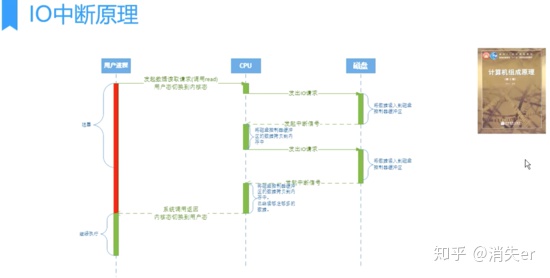
User processes need to read disk data, requiring CPU interrupts to initiate IO requests. Each IO interrupt brings CPU context switching.
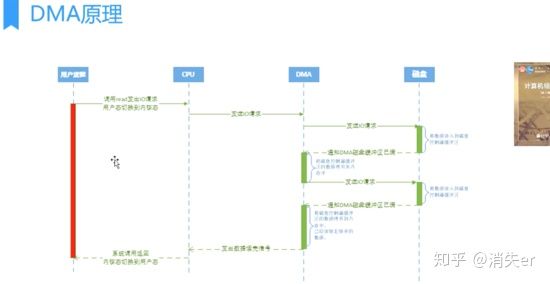
Thus DMA appeared.
DMA (Direct Memory Access) is an important feature of all modern computers, allowing hardware devices of different speeds to communicate without relying on heavy CPU interrupt loads. The DMA controller takes over data read/write requests, reducing CPU burden. This way, the CPU can work efficiently. Modern hard drives basically all support DMA.
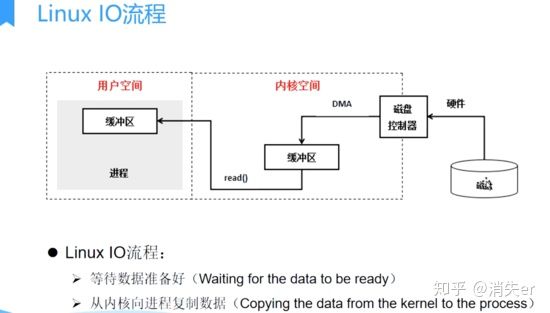
Linux IO Flow
Actual IO reading involves two processes:
- DMA waits for data to be ready, reads disk data to OS kernel buffer;
- User process copies data from kernel buffer to user space. Both processes are blocking.
Traditional Data Transfer
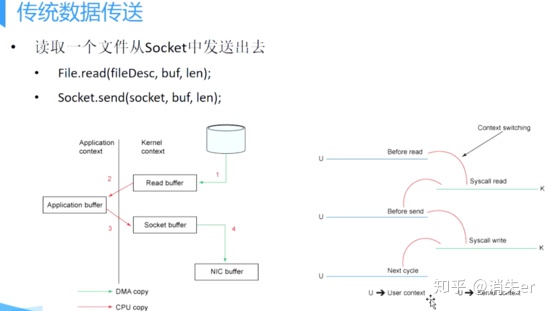
For example: reading a file and sending it via socket. Traditional implementation: Read first, then send, actually going through 1-4 copies.
buffer = File.read
Socket.send(buffer)
- First: Read disk file to OS kernel buffer;
- Second: Copy kernel buffer data to application buffer;
- Third: Copy application buffer data to socket network send buffer (belongs to OS kernel buffer);
- Fourth: Copy socket buffer data to network card for network transmission.
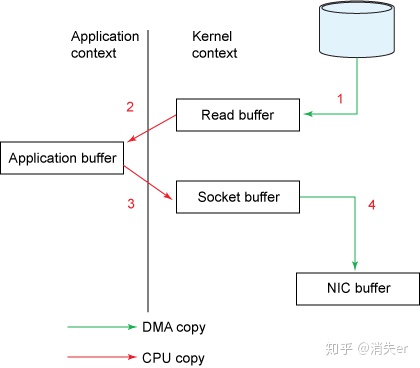
Traditional method of reading disk files and sending over network involves four data copies, which is very cumbersome. Actual IO read/write requires IO interrupts and CPU response (bringing context switching). Although DMA was later introduced to take over CPU interrupt requests, four copies still have "unnecessary copying."
Rethinking traditional IO, you'll notice the second and third data copies aren't actually needed. The application does nothing but cache data and transfer it back to the socket buffer. Instead, data can be transferred directly from read buffer to socket buffer.
Clearly, the second and third data copies don't help in this scenario but add overhead - this is the background and significance of zero-copy.
Traditional data transfer costs: 4 copies, 4 context switches. 4 copies: 2 DMA copies, 2 CPU copies. As shown: Copying is an IO process requiring system calls.
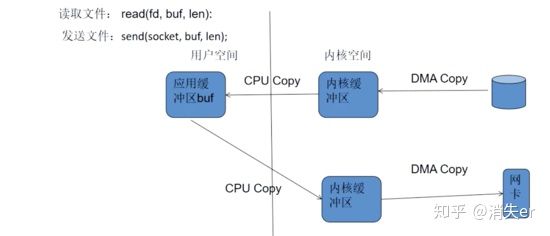
Note: Kernel reading data from disk doesn't consume CPU time - it's done by the disk controller; called DMA Copy. Network card sending also uses DMA.
Emergence of Zero-Copy
Purpose: Reduce unnecessary copies in IO flow. Zero-copy needs OS support, meaning kernel-exposed APIs. Virtual machines can't operate the kernel.
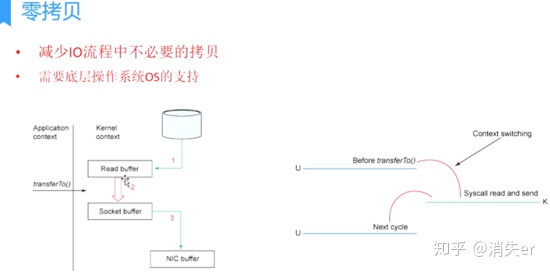
Linux Supported (Common) Zero-Copy
1. mmap Memory Mapping
Data loaded from disk is stored in a kernel buffer by DMA copy. Then the pages of the application buffer are mapped to the kernel buffer, so that the data copy between kernel buffers and application buffers are omitted.
After DMA loads disk data to kernel buffer, application buffers and kernel buffer are mapped, so data changes in application buffer and kernel buffer can be omitted.
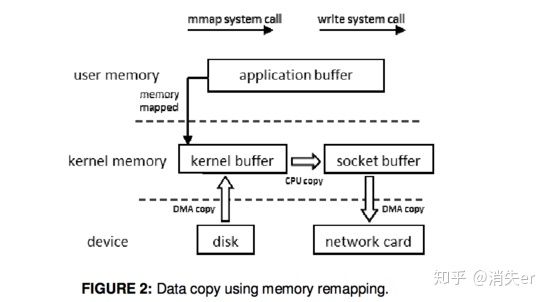
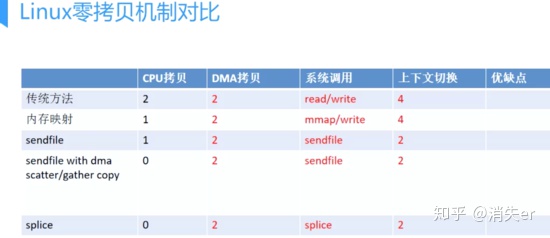
mmap memory mapping involves: 3 copies: 1 CPU copy, 2 DMA copies; and 4 context switches.
2. sendfile
Linux 2.1 supported sendfile
When calling the sendfile() system call, data are fetched from disk and copied into a kernel buffer by DMA copy. Then data are copied directly from the kernel buffer to the socket buffer. Once all data are copied into the socket buffer, the sendfile() system call will return to indicate the completion of data transfer from the kernel buffer to socket buffer. Then, data will be copied to the buffer on the network card and transferred to the network.
When calling sendfile(), DMA copies disk data to kernel buffer, then kernel buffer is directly copied to socket buffer; Once all data is copied to socket buffer, sendfile() returns, indicating data transfer completion. Data in socket buffer can then be transmitted over the network.
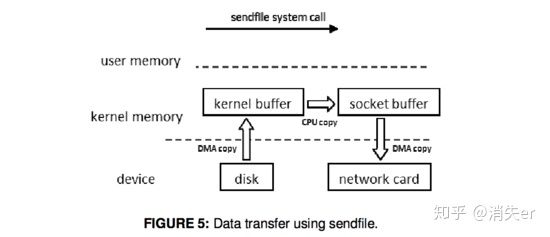
sendfile involves: 3 copies, 1 CPU copy, 2 DMA copies; and 2 context switches.
3. Sendfile With DMA Scatter/Gather Copy
Then by using the DMA scatter/gather operation, the network interface card can gather all the data from different memory locations and store the assembled packet in the network card buffer.
Scatter/Gather can be seen as an enhanced version of sendfile - batch sendfile.
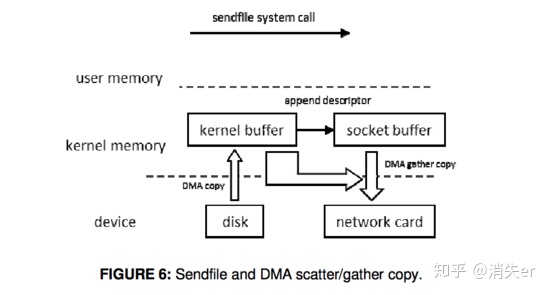
Scatter/Gather involves 2 copies: 0 CPU copies, 2 DMA copies.
IO Request Batching
DMA scatter/gather: Requires DMA controller support. DMA workflow: CPU sends IO request to DMA, DMA then reads data. IO request: Can be seen as containing a physical address. Reading data from a series of physical addresses (10): Regular DMA (10 requests) DMA scatter/gather: Give 10 physical addresses at once, one request is enough (batch processing).
4. splice
Linux 2.6.17 supports splice
It does not need to copy data between kernel space and user space. When using this approach, data are copied from disk to kernel buffer first. Then the splice() system call allows data to move between different buffers in kernel space without the copy to user space. Unlike the method sendfile() with DMA scatter/gather copy, splice() does not need support from hardware.
After data is read from disk to OS kernel buffer, it can be directly converted to other data buffers in kernel space without copying to user space. As shown, after reading from disk to kernel buffer, a pipe is directly established with socket buffer in kernel space. Unlike sendfile(), splice() doesn't need hardware support.
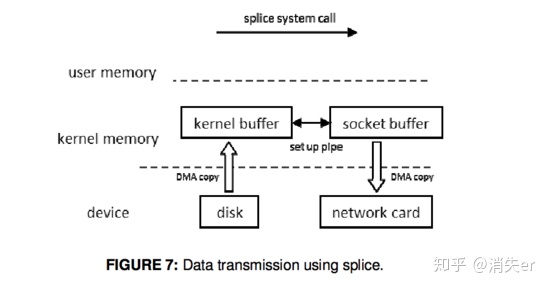
Note the difference between splice and sendfile: sendfile loads disk data to kernel buffer, then needs one CPU copy to socket buffer. splice goes further - even this CPU copy isn't needed, directly setting up a pipe between two kernel space buffers.
splice involves 2 copies: 0 CPU copies, 2 DMA copies; and 2 context switches.
Linux Zero-Copy Mechanism Comparison
Whether traditional IO or with zero-copy, 2 DMA copies are unavoidable because both DMA operations depend on hardware.
Broad vs Narrow Definition of Zero-Copy
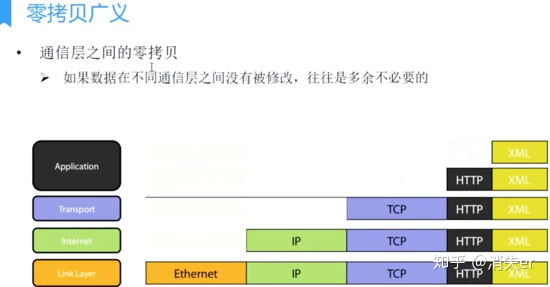
Actually, zero-copy has broad and narrow definitions. Broad zero-copy: Anything that reduces copy count and unnecessary data copying counts as "zero-copy." This is currently the most widespread definition of zero-copy. We need to know this is broad zero-copy, not OS-level zero-copy.
Broad Nature of Zero-Copy
The earliest zero-copy definition came from:
Linux 2.4 kernel added sendfile system call, providing zero-copy. Disk data is DMA copied to kernel Buffer, then directly DMA copied to NIC Buffer (socket buffer), no CPU copy needed. This is the origin of the term zero-copy. This is true OS-level zero-copy (narrow zero-copy).
But we know OS kernel-provided zero-copy hasn't developed many types - such zero-copy isn't abundant.
As development progressed, zero-copy's concept extended to include reducing unnecessary data copying as zero-copy.
Unfortunately, some developers, organizations, and frameworks "abuse" the zero-copy concept in product promotion or competition, packaging it as "performance... so high, using zero-copy..."
Especially during framework incubation and promotion, competing for market share, such marketing might impress those not very familiar with the technology.
The purpose of mentioning this today is to make everyone understand that when seeing "xxx framework uses zero-copy underneath," it might not be true zero-copy, just borrowing the concept.
This isn't to deny frameworks borrowing concepts - after all, as development progressed, zero-copy's concept extended to include new things.
What I want to emphasize is that as frontline technicians, we shouldn't be blinded by marketing; we need to clearly know that data merging to reduce copying and kernel-provided APIs have vastly different performance improvements.
With a little deeper understanding, the truth becomes clear - whether it's just application-layer data optimization or truly fitting the scenario and flexibly using OS-level zero-copy will surface.
Later, we'll also analyze common frameworks using zero-copy.
Java Zero-Copy Mechanism Analysis
Java doesn't fully support all Linux zero-copy technologies, supporting 2 (memory mapping mmap, sendfile);
NIO's Memory Mapping MappedByteBuffer
- First, Java NIO's Channel is equivalent to OS kernel buffer, possibly read buffer or network buffer, while Buffer is equivalent to OS user buffer.
MappedByteBuffer mappedByteBuffer = new RandomAccessFile(file, "r")
                                 .getChannel()
                                .map(FileChannel.MapMode.READ_ONLY, 0, len);
Underneath it calls Linux mmap().
NIO's FileChannel.map() method uses OS memory mapping, calling Linux mmap() underneath.
It maps kernel buffer memory to user buffer memory. This method is suitable for reading large files and can also modify file content, but if sending via SocketChannel afterward, CPU data copying is still needed. Using MappedByteBuffer for small files isn't efficient; single process access isn't efficient either.
MappedByteBuffer can only be obtained through FileChannel's map() - no other way. FileChannel.map() is abstract, implemented in FileChannelImpl.c. Its map0() method calls Linux kernel's mmap API. Note when using MappedByteBuffer: mmap file mapping is only released during full GC. When closing, manually clear memory-mapped files by reflectively calling sun.misc.Cleaner method.
NIO's sendfile
- FileChannel.transferTo() directly transfers current channel content to another channel without any Buffer operations. NIO Buffer is JVM heap or off-heap memory, but either way they're OS kernel space memory.
- transferTo()'s implementation is through sendfile() system call (on Linux)
// Using sendfile: read disk file and send over network
FileChannel sourceChannel = new RandomAccessFile(source, "rw").getChannel();
SocketChannel socketChannel = SocketChannel.open(sa);
sourceChannel.transferTo(0, sourceChannel.size(), socketChannel);
ZeroCopyFile File Copy Implementation
class ZeroCopyFile {

    public void copyFile(File src, File dest) {
        try (FileChannel srcChannel = new FileInputStream(src).getChannel();
             FileChannel destChannel = new FileInputStream(dest).getChannel()) {

            srcChannel.transferTo(0, srcChannel.size(), destChannel);
        } catch (IOException e) {
            e.printStackTrace();
        }
    }
}
Note: Java NIO's FileChannel.transferTo and transferFrom don't guarantee zero-copy. Whether zero-copy is used depends on the OS. If the OS provides sendfile-like zero-copy system calls, these methods will fully utilize zero-copy advantages; otherwise, zero-copy can't be achieved through these methods alone.
Zero-Copy in Kafka
Kafka uses zero-copy in two important processes, both OS-level narrow zero-copy: Producer storing data to broker, and Consumer reading data from broker.
- Producer data persisting to broker uses mmap file mapping for fast sequential writes;
- Consumer reading from broker uses sendfile, reading disk files to OS kernel buffer, then directly to socket buffer for network transmission.
Zero-Copy in Netty
Netty's Zero-copy differs from OS-level Zero-copy mentioned above. Netty's Zero-copy is entirely in user space (Java level), more oriented toward optimizing data operations.
Netty's Zero-copy manifests in several aspects:
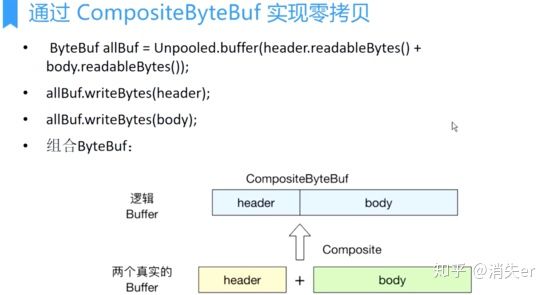
- Netty provides CompositeByteBuf class, which can merge multiple ByteBufs into one logical ByteBuf, avoiding copying between ByteBufs.
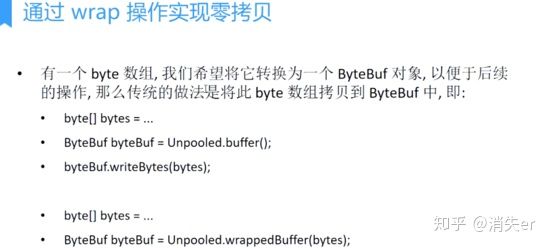
- Through wrap operations, byte[] arrays, ByteBuf, ByteBuffer, etc. can be wrapped into a Netty ByteBuf object, avoiding copy operations.
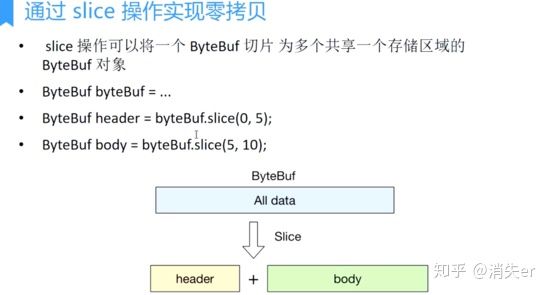
- ByteBuf supports slice operations, so ByteBuf can be decomposed into multiple ByteBufs sharing the same storage area, avoiding memory copying.
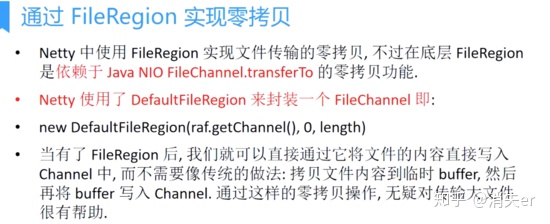
- FileRegion wrapping FileChannel.transferTo implements file transfer, directly sending file buffer data to target Channel, avoiding memory copying issues from traditional loop write methods.
Careful readers will know: The first three are broad zero-copy, reducing unnecessary data copying; oriented toward application-layer data optimization.
FileRegion wrapping FileChannel.transferTo is true zero-copy. Let's look at each implementation. The following analysis won't deliberately distinguish broad and narrow zero-copy - readers just need to understand the differences and their respective impacts on applications.
Zero-Copy via CompositeByteBuf
- Merges multiple ByteBufs into one logical ByteBuf - simply understood as using a linked list to connect scattered ByteBufs through references;
- Scattered ByteBufs may be different-sized, non-contiguous memory areas, linked together as one large logical area.
- During actual data reading, each small block is still read individually.
Zero-Copy via Wrap Operations
- Wraps byte[] arrays, ByteBuf, ByteBuffer, etc. into a Netty ByteBuf object;
- This is simple - those who've read ByteBuf source code know ByteBuf composes (contains) byte[];
- Using Unpooled.wrappedBuffer to wrap bytes into an UnpooledHeapByteBuf object involves no copy operations. The generated ByteBuf object shares the same storage space with the bytes array - modifications to bytes reflect in the ByteBuf object.
Zero-Copy via Slice Operations
- Decomposes ByteBuf into multiple ByteBufs sharing the same storage area
- slice divides one whole area into logically independent small areas;
- When reading each logical small area, it actually reads from the original memory buffer according to slice(int index, int length) index and length.
Zero-Copy via FileRegion
- FileRegion wrapping FileChannel.transferTo implements file transfer, directly sending file buffer data to target Channel;
- This is OS-level zero-copy
Extended reading: https://pdfs.semanticscholar.org