A Complete Guide to Using publishOn and subscribeOn in WebFlux
1. Introduction
When learning Project Reactor, using publishOn and subscribeOn always confused me because often when I expected parallel execution, it ran sequentially instead. This article will use various examples to distinguish between the two and thoroughly clarify how to use them.
2. Before We Begin
I hope you already know the basic concepts of publishOn and subscribeOn.
publishOn is used to change the thread on which subsequent operators execute. It affects which thread the operators after it run on.
For example, the following code:
Flux.range(0, 3)
    .map(it - > {
        System.out.println("Current thread name output 1: " + Thread.currentThread().getName());
        return it;
    })
    .publishOn(Schedulers.newParallel("NEW"))
    .map(it - > {
        System.out.println("Current thread name output 2: " + Thread.currentThread().getName());
        return it;
    })
    .subscribe();
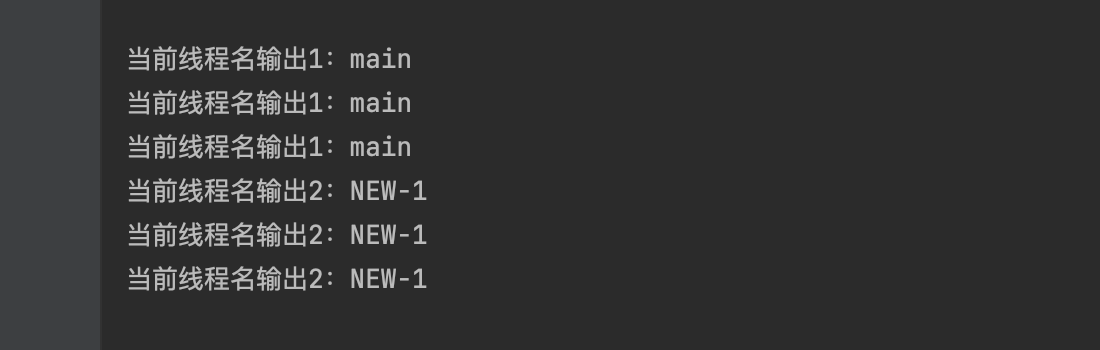
In the first map, the output thread name is main, while in the second map, it outputs NEW
subscribeOn specifies the thread scheduler to use when execution begins.
Specifically, subscribeOn affects the starting part of the entire data flow, from the subscribe operator to the starting publisher. It determines which thread the subscription operation executes on, thereby affecting the execution context of the entire data flow.
Using code as an example:
Flux.range(0, 3)
    .map(it - > {
        System.out.println("Current thread name output 1: " + Thread.currentThread().getName());
        return it;
    })
    .map(it - > {
        System.out.println("Current thread name output 2: " + Thread.currentThread().getName());
        return it;
    })
    .subscribeOn(Schedulers.newParallel("NEW"))
    .subscribe();
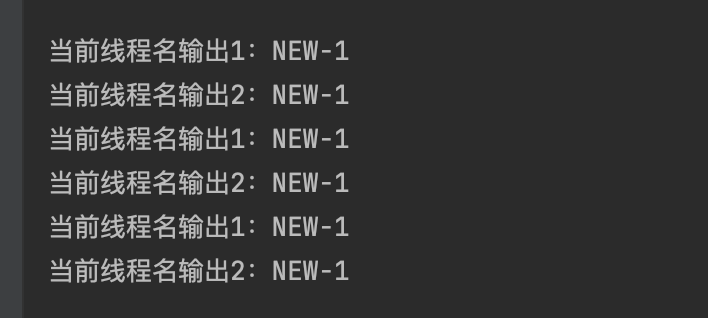
Although I placed the subscribeOn operation at the end, during execution, it causes the entire flow to execute on the NEW thread from the very beginning
This is the basic knowledge you need to know. Now let's look at something different.
2.1 Mock Server
We need some preparation. Create a new SpringBoot project and set up a simple Mock Server to simulate third-party services we request during work.
The code only has one controller that returns after a one-second delay:
@SpringBootApplication
@RequestMapping("/")
@Controller
public class TempHttpServerApplication {

    public static void main(String[] args) {
        SpringApplication.run(TempHttpServerApplication.class, args);
    }

    @GetMapping("")
    @ResponseBody
    public String hello() throws InterruptedException {
        Thread.sleep(1000);
        return "hello SpringBoot";
    }

}
3. Starting from the Simplest
In the following code, we output 1 to 10. This is the simplest example:
public static void main(String[] args) {
    Flux.range(1, 10)
        .subscribe(it -> System.out.println(it));
}
Next, we add an executeRequest method to request our Mock Server. We call it during flow execution. Since we're executing in the map method, looking at the output dates, it's obvious the entire flow executes sequentially.
public static void main(String[] args) {
        Flux.range(1, 10)
                .map(it -> executeRequest())
                .subscribe(it -> {
                    System.out.println(Instant.now() + " " +it);
                });
    }

    private static String executeRequest(){
        RestTemplate restTemplate = new RestTemplate();
        return restTemplate.exchange("http://localhost:8888", HttpMethod.GET, null, String.class).getBody();
    }
2024-02-24T02:59:38.612704Z hello SpringBoot
2024-02-24T02:59:39.626442Z hello SpringBoot
2024-02-24T02:59:40.635633Z hello SpringBoot
2024-02-24T02:59:41.643354Z hello SpringBoot
2024-02-24T02:59:42.646554Z hello SpringBoot
2024-02-24T02:59:43.654952Z hello SpringBoot
2024-02-24T02:59:44.658078Z hello SpringBoot
2024-02-24T02:59:45.662179Z hello SpringBoot
2024-02-24T02:59:46.666218Z hello SpringBoot
2024-02-24T02:59:47.671938Z hello SpringBoot
3.1 .map → .flatMap
In the example above, if we change .map to .flatMap, since flatMap executes in parallel by default, but in actual execution, if the operation inside .flatMap is synchronous, meaning: Mono.just(executeRequest()), it causes the entire flow to become synchronous.
public static void main(String[] args) throws InterruptedException {
    Flux.range(1, 10)
            .flatMap(it -> Mono.just(executeRequest()), 8)
            .subscribe(it -> {
                System.out.println(Instant.now() + " " +it);
            });
}

private static String executeRequest(){
    RestTemplate restTemplate = new RestTemplate();
    return restTemplate.exchange("http://localhost:8888", HttpMethod.GET, null, String.class).getBody();
}
3.2 Adding publishOn
To make the execution inside flatMap parallel, some might say: use publishOn!
Unfortunately, in the following example, although publishOn is used to make downstream threads execute in a new thread group, because there's a synchronous operation inside flatMap, meaning: Mono.just(executeRequest()), the entire flow still executes synchronously.
public static void main(String[] args) throws InterruptedException {
    Flux.range(1, 10)
        .publishOn(Schedulers.newParallel("REQ-T", 2))
        .flatMap(it - > Mono.just(executeRequest()), 2)
        .subscribe(it - > {
            System.out.println(Instant.now() + " " + it);
        });
}

private static String executeRequest() {
    RestTemplate restTemplate = new RestTemplate();
    return restTemplate.exchange("http://localhost:8888", HttpMethod.GET, null, String.class).getBody();
}
3.3 What About Using subscribeOn?
Subscribing to the inner flow executes on other threads, and setting flatMap's concurrency to 2, but the entire flow still executes synchronously because
Mono.just means hot data - it synchronously executes to get the value each time, so execution remains synchronous.
public static void main(String[] args) throws InterruptedException {
    Flux.range(1, 10)
            .flatMap(it -> Mono.just(executeRequest())
                            .subscribeOn(Schedulers.newParallel("REQ-T", 2))
                            .log()
            , 2)
            .subscribe(it -> {
                System.out.println(Instant.now() + " " +it);
            });
}

private static String executeRequest(){
    RestTemplate restTemplate = new RestTemplate();
    return restTemplate.exchange("http://localhost:8888", HttpMethod.GET, null, String.class).getBody();
}
Log:
11:03:44.820 [main] INFO reactor.Mono.SubscribeOnValue.1 -- onSubscribe([Fuseable] FluxSubscribeOnValue.ScheduledScalar)
11:03:44.822 [main] INFO reactor.Mono.SubscribeOnValue.1 -- request(32)
11:03:44.824 [REQ-T-1] INFO reactor.Mono.SubscribeOnValue.1 -- onNext(hello SpringBoot)
2024-02-24T03:03:44.824966Z hello SpringBoot
11:03:44.827 [REQ-T-1] INFO reactor.Mono.SubscribeOnValue.1 -- onComplete()
11:03:45.829 [main] INFO reactor.Mono.SubscribeOnValue.2 -- onSubscribe([Fuseable] FluxSubscribeOnValue.ScheduledScalar)
11:03:45.829 [main] INFO reactor.Mono.SubscribeOnValue.2 -- request(32)
11:03:45.829 [REQ-T-2] INFO reactor.Mono.SubscribeOnValue.2 -- onNext(hello SpringBoot)
2024-02-24T03:03:45.830078Z hello SpringBoot
11:03:45.830 [REQ-T-2] INFO reactor.Mono.SubscribeOnValue.2 -- onComplete()
11:03:46.837 [main] INFO reactor.Mono.SubscribeOnValue.3 -- onSubscribe([Fuseable] FluxSubscribeOnValue.ScheduledScalar)
11:03:46.837 [main] INFO reactor.Mono.SubscribeOnValue.3 -- request(32)
11:03:46.838 [REQ-T-3] INFO reactor.Mono.SubscribeOnValue.3 -- onNext(hello SpringBoot)
2024-02-24T03:03:46.838210Z hello SpringBoot
11:03:46.838 [REQ-T-3] INFO reactor.Mono.SubscribeOnValue.3 -- onComplete()
11:03:47.848 [main] INFO reactor.Mono.SubscribeOnValue.4 -- onSubscribe([Fuseable] FluxSubscribeOnValue.ScheduledScalar)
11:03:47.849 [main] INFO reactor.Mono.SubscribeOnValue.4 -- request(32)
11:03:47.849 [REQ-T-4] INFO reactor.Mono.SubscribeOnValue.4 -- onNext(hello SpringBoot)
2024-02-24T03:03:47.850130Z hello SpringBoot
11:03:47.850 [REQ-T-4] INFO reactor.Mono.SubscribeOnValue.4 -- onComplete()
11:03:48.861 [main] INFO reactor.Mono.SubscribeOnValue.5 -- onSubscribe([Fuseable] FluxSubscribeOnValue.ScheduledScalar)
11:03:48.861 [main] INFO reactor.Mono.SubscribeOnValue.5 -- request(32)
11:03:48.861 [REQ-T-5] INFO reactor.Mono.SubscribeOnValue.5 -- onNext(hello SpringBoot)
2024-02-24T03:03:48.861965Z hello SpringBoot
11:03:48.862 [REQ-T-5] INFO reactor.Mono.SubscribeOnValue.5 -- onComplete()
11:03:49.871 [main] INFO reactor.Mono.SubscribeOnValue.6 -- onSubscribe([Fuseable] FluxSubscribeOnValue.ScheduledScalar)
11:03:49.871 [main] INFO reactor.Mono.SubscribeOnValue.6 -- request(32)
11:03:49.871 [REQ-T-6] INFO reactor.Mono.SubscribeOnValue.6 -- onNext(hello SpringBoot)
2024-02-24T03:03:49.871636Z hello SpringBoot
11:03:49.871 [REQ-T-6] INFO reactor.Mono.SubscribeOnValue.6 -- onComplete()
11:03:50.879 [main] INFO reactor.Mono.SubscribeOnValue.7 -- onSubscribe([Fuseable] FluxSubscribeOnValue.ScheduledScalar)
11:03:50.879 [main] INFO reactor.Mono.SubscribeOnValue.7 -- request(32)
11:03:50.880 [REQ-T-7] INFO reactor.Mono.SubscribeOnValue.7 -- onNext(hello SpringBoot)
2024-02-24T03:03:50.880186Z hello SpringBoot
11:03:50.880 [REQ-T-7] INFO reactor.Mono.SubscribeOnValue.7 -- onComplete()
11:03:51.884 [main] INFO reactor.Mono.SubscribeOnValue.8 -- onSubscribe([Fuseable] FluxSubscribeOnValue.ScheduledScalar)
11:03:51.885 [main] INFO reactor.Mono.SubscribeOnValue.8 -- request(32)
11:03:51.885 [REQ-T-8] INFO reactor.Mono.SubscribeOnValue.8 -- onNext(hello SpringBoot)
2024-02-24T03:03:51.885495Z hello SpringBoot
11:03:51.885 [REQ-T-8] INFO reactor.Mono.SubscribeOnValue.8 -- onComplete()
11:03:52.895 [main] INFO reactor.Mono.SubscribeOnValue.9 -- onSubscribe([Fuseable] FluxSubscribeOnValue.ScheduledScalar)
11:03:52.896 [main] INFO reactor.Mono.SubscribeOnValue.9 -- request(32)
11:03:52.896 [REQ-T-9] INFO reactor.Mono.SubscribeOnValue.9 -- onNext(hello SpringBoot)
2024-02-24T03:03:52.896721Z hello SpringBoot
11:03:52.896 [REQ-T-9] INFO reactor.Mono.SubscribeOnValue.9 -- onComplete()
11:03:53.903 [main] INFO reactor.Mono.SubscribeOnValue.10 -- onSubscribe([Fuseable] FluxSubscribeOnValue.ScheduledScalar)
11:03:53.904 [main] INFO reactor.Mono.SubscribeOnValue.10 -- request(32)
11:03:53.904 [REQ-T-10] INFO reactor.Mono.SubscribeOnValue.10 -- onNext(hello SpringBoot)
2024-02-24T03:03:53.904910Z hello SpringBoot
11:03:53.905 [REQ-T-10] INFO reactor.Mono.SubscribeOnValue.10 -- onComplete()
3.4 publishOn+subscribeOn
We all know that publishOn targets operations in the subsequent flow. Because executeRequest is synchronous and uses Mono.just, the entire flow remains synchronous.
public static void main(String[] args) throws InterruptedException {
        Flux.range(1, 10)
                .publishOn(Schedulers.newParallel("publishOn-T", 2))
                .flatMap(it -> Mono.just(executeRequest())
                                .subscribeOn(Schedulers.newParallel("subscribeOn-T", 2))
                ,2)
                .subscribe(it -> {
                    System.out.println(Instant.now() + " " +it);
                });
    }

    private static String executeRequest(){
        RestTemplate restTemplate = new RestTemplate();
        return restTemplate.exchange("http://localhost:8888", HttpMethod.GET, null, String.class).getBody();
    }
3.5 The Key: Mono.fromCallable
The following example finally achieves asynchronous requests, with concurrency controlled by flatMap's second parameter. Here the concurrency is 2:
public static void main(String[] args) {
    Flux.range(1, 10)
            .flatMap(it -> Mono.fromCallable(()->executeRequest())
                            .subscribeOn(Schedulers.newParallel("subscribeOn-T", 2))
                    , 2)
            .subscribe(it -> {
                System.out.println(Instant.now() + " " +it);
            });
}

private static String executeRequest(){
    RestTemplate restTemplate = new RestTemplate();
    return restTemplate.exchange("http://localhost:8888", HttpMethod.GET, null, String.class).getBody();
}
Here the concurrency is 8, controlled by flatMap's second parameter:
public static void main(String[] args) throws InterruptedException {
    CountDownLatch countDownLatch = new CountDownLatch(1);
    Flux.range(1, 10)
            .flatMap(it -> Mono.fromCallable(()->executeRequest())
                            .subscribeOn(Schedulers.newParallel("subscribeOn-T", 2))
            , 8)
            .doOnComplete(countDownLatch::countDown)
            .subscribe(it -> {
                System.out.println(Instant.now() + " " +it);
            });
    countDownLatch.await();
}

private static String executeRequest(){
    RestTemplate restTemplate = new RestTemplate();
    return restTemplate.exchange("http://localhost:8888", HttpMethod.GET, null, String.class).getBody();
}
3.6 Difference Between Schedulers.newParallel and Schedulers.single
Using .subscribeOn(Schedulers.single()) results in sequential execution:
public static void main(String[] args) throws InterruptedException {
    CountDownLatch countDownLatch = new CountDownLatch(1);
    Flux.range(1, 10)
            .flatMap(it -> Mono.fromCallable(()->executeRequest())
                            .subscribeOn(Schedulers.single())
                    ,8)
            .doOnComplete(countDownLatch::countDown)
            .subscribe(it -> {
                System.out.println(Instant.now() + " " +it);
            });
    countDownLatch.await();
}

private static String executeRequest(){
    RestTemplate restTemplate = new RestTemplate();
    return restTemplate.exchange("http://localhost:8888", HttpMethod.GET, null, String.class).getBody();
}
Using Schedulers.newParallel("subscribeOn-T", 1) results in parallel execution:
public static void main(String[] args) {
    Flux.range(1, 10)
            .flatMap(it -> Mono.fromCallable(()->executeRequest())
                            .subscribeOn(Schedulers.newParallel("subscribeOn-T", 1))
                    ,8)
            .subscribe(it -> {
                System.out.println(Instant.now() + " " +it);
            });
}

private static String executeRequest(){
    RestTemplate restTemplate = new RestTemplate();
    return restTemplate.exchange("http://localhost:8888", HttpMethod.GET, null, String.class).getBody();
}
The reason is that when using Schedulers.single(), it places each task in a shared single-thread pool for execution. This means tasks execute sequentially one after another because they all run on the same thread.
3.7 Mono.defer, Flux.defer, Mono.fromSupplier
Besides using Mono.fromCallable, you can use Mono.defer, or Flux.defer, Mono.fromSupplier.
The essence of these is treating executeRequest as cold data, only executing when actually called.
What, you still don't understand the difference between cold and hot data?
Flux.just(new Date(), new Date(), new Date())- the time is already determined when the subscription event occurs.
Flux.defer(() -> Mono.just(new Date())).repeat(2)- the current time is only calculated when this method executes.
Mono.defer example:
public static void main(String[] args) throws InterruptedException {
    CountDownLatch countDownLatch = new CountDownLatch(1);
    Flux.range(1, 10)
            .flatMap(it -> Mono.defer(() -> Mono.just(executeRequest()))
                            .subscribeOn(Schedulers.newParallel("subscribeOn-T", 1))
                    ,8)
            .doOnComplete(countDownLatch::countDown)
            .subscribe(it -> {
                System.out.println(Instant.now() + " " +it);
            });
    countDownLatch.await();
}

private static String executeRequest(){
    RestTemplate restTemplate = new RestTemplate();
    return restTemplate.exchange("http://localhost:8888", HttpMethod.GET, null, String.class).getBody();
}
Mono.fromSupplier example:
public static void main(String[] args) throws InterruptedException {
    CountDownLatch countDownLatch = new CountDownLatch(1);
    Flux.range(1, 10)
            .flatMap(it -> Mono.fromSupplier(() -> executeRequest())
                            .subscribeOn(Schedulers.newParallel("subscribeOn-T", 1))
                    ,8)
            .doOnComplete(countDownLatch::countDown)
            .subscribe(it -> {
                System.out.println(Instant.now() + " " +it);
            });
    countDownLatch.await();
}

private static String executeRequest(){
    RestTemplate restTemplate = new RestTemplate();
    return restTemplate.exchange("http://localhost:8888", HttpMethod.GET, null, String.class).getBody();
}
3.8 Using subscribeOn
The core of subscribeOn is when the subscribed event is a synchronous operation and we want to make it asynchronous, we use subscribeOn, such as IO operations, saving to DB, including subscribing to inner flow execution.
Mono.fromCallable(()->{
    return Mono.just(mongoTemplate.insertOne(xxx))
})
.subscribeOn(Schedulers.boundedElastic())
I hope the examples above have helped you understand how to use subscribeOn.
4. publishOn
publishOn switches subsequent operations to a new scheduler thread pool. flatMap concurrency defaults to being related to the computer's core count. Let's start with a new example. We need to change the mock server response to this:
Changed the mock server response:
@SpringBootApplication
@RequestMapping("/")
@Controller
public class TempHttpServerApplication {

    public static void main(String[] args) {
        SpringApplication.run(TempHttpServerApplication.class, args);
    }

    @GetMapping("")
    @ResponseBody
    public String hello() throws InterruptedException {
        Thread.sleep(1000);
        return new Date().toString();
    }

}
Next is our test code. Without using publishOn, we sleep for 3 seconds in subscribe, then output the mock server's return:
public static void main(String[] args) throws InterruptedException {
    CountDownLatch countDownLatch = new CountDownLatch(1);
    Flux.range(1, 10)

            .flatMap(it -> Mono.fromCallable(()->executeRequest())
                            .subscribeOn(Schedulers.newSingle("REQ-T"))
                    ,3)
//                .publishOn(Schedulers.newSingle("SOUT-T"))
            .doOnComplete(countDownLatch::countDown)
            .subscribe(it -> {
                try {
                    Thread.sleep(3000);
                } catch (InterruptedException e) {
                    throw new RuntimeException(e);
                }
                System.out.println(Thread.currentThread().getName() +" " + Instant.now() + " " +it);
            });
    countDownLatch.await();
}

private static String executeRequest(){
    RestTemplate restTemplate = new RestTemplate();
    return restTemplate.exchange("http://localhost:8888", HttpMethod.GET, null, String.class).getBody();
}
In the example above, without publishOn, the log output is:
REQ-T-3 2024-02-24T03:16:40.634093Z Sat Feb 24 11:16:37 CST 2024
REQ-T-3 2024-02-24T03:16:43.645577Z Sat Feb 24 11:16:37 CST 2024
REQ-T-3 2024-02-24T03:16:46.646355Z Sat Feb 24 11:16:37 CST 2024
REQ-T-5 2024-02-24T03:16:50.673382Z Sat Feb 24 11:16:47 CST 2024
REQ-T-5 2024-02-24T03:16:53.674860Z Sat Feb 24 11:16:47 CST 2024
REQ-T-5 2024-02-24T03:16:56.680422Z Sat Feb 24 11:16:47 CST 2024
REQ-T-7 2024-02-24T03:17:00.693387Z Sat Feb 24 11:16:57 CST 2024
REQ-T-7 2024-02-24T03:17:03.695553Z Sat Feb 24 11:16:57 CST 2024
REQ-T-7 2024-02-24T03:17:06.701117Z Sat Feb 24 11:16:57 CST 2024
REQ-T-10 2024-02-24T03:17:10.716434Z Sat Feb 24 11:17:07 CST 2024
Take a minute to think: why do the responses of 10 requests seem to be divided into 4 groups, with each group having the same response time, and the time difference between adjacent groups being 10 seconds?
Because without publishOn switching to a new thread group for execution, the code in .subscribe(it -> { is also executed by a single thread in Schedulers.newSingle("REQ-T"). So in flatMap, 3 requests are sent simultaneously, the server sleeps for 1 second, and in subscribe, each request sleeps for 3 seconds.
So 10 seconds = 1 second (server response) + 3 (requests) * 3 (each request sleeps 3 seconds)
Due to the characteristics of publishOn, we can typically use it like this, for example, switching to a new thread group for insert:
Mono<Void> fluxToBlockingRepository(Flux<User> flux,
                                    BlockingRepository<User> repository) {
    return flux
            .publishOn(Schedulers.elastic())
            .doOnNext(repository::save)
            .then();
}
4.1 Use Cases for publishOn
Let's increase the difficulty and simulate a work scenario. Often we first request data from 1 or 2 APIs to assemble, then request other APIs, like this:
First execute executeRequest in the first flatMap,
Then switch to the "BBB-T" thread group via publishOn, with 60 threads,
Then execute executeRequest in the second flatMap. This simulates requesting other APIs after assembling data. Is the entire flow's execution parallel, sequential, or partially parallel/partially sequential?
public static void main(String[] args) throws InterruptedException {
    CountDownLatch countDownLatch = new CountDownLatch(1);
    Flux.range(1, 10)
            .flatMap(it -> Mono.fromCallable(() -> executeRequest())
                            .subscribeOn(Schedulers.newSingle("AAA-T"))
            , 3)
            .doOnNext(it -> {
                System.out.println(Thread.currentThread().getName() +" " + Instant.now() + " " +it);
            })
            .publishOn(Schedulers.newParallel("BBB-T", 60))
            .flatMap(item -> {
                return Mono.fromCallable(() -> executeRequest());
            }, 2)
            .doOnComplete(countDownLatch::countDown)
            .subscribe(it -> {
                System.out.println(Thread.currentThread().getName() +" " + Instant.now() + " " +it);
            });
    countDownLatch.await();
}

private static String executeRequest(){
    RestTemplate restTemplate = new RestTemplate();
    return restTemplate.exchange("http://localhost:8888", HttpMethod.GET, null, String.class).getBody();
}
After execution, the log output is:
AAA-T-3 2024-02-21T06:16:36.428794Z Wed Feb 21 14:16:36 CST 2024
AAA-T-3 2024-02-21T06:16:36.434086Z Wed Feb 21 14:16:36 CST 2024
AAA-T-3 2024-02-21T06:16:36.434188Z Wed Feb 21 14:16:36 CST 2024
AAA-T-6 2024-02-21T06:16:37.440315Z Wed Feb 21 14:16:37 CST 2024
BBB-T-1 2024-02-21T06:16:37.440402Z Wed Feb 21 14:16:37 CST 2024
AAA-T-4 2024-02-21T06:16:37.443843Z Wed Feb 21 14:16:37 CST 2024
AAA-T-4 2024-02-21T06:16:37.444355Z Wed Feb 21 14:16:37 CST 2024
BBB-T-1 2024-02-21T06:16:38.445792Z Wed Feb 21 14:16:38 CST 2024
AAA-T-9 2024-02-21T06:16:38.448931Z Wed Feb 21 14:16:38 CST 2024
AAA-T-9 2024-02-21T06:16:38.449036Z Wed Feb 21 14:16:38 CST 2024
AAA-T-8 2024-02-21T06:16:38.453588Z Wed Feb 21 14:16:38 CST 2024
BBB-T-1 2024-02-21T06:16:39.450717Z Wed Feb 21 14:16:39 CST 2024
AAA-T-10 2024-02-21T06:16:39.455242Z Wed Feb 21 14:16:39 CST 2024
BBB-T-1 2024-02-21T06:16:40.456177Z Wed Feb 21 14:16:40 CST 2024
BBB-T-1 2024-02-21T06:16:41.465664Z Wed Feb 21 14:16:41 CST 2024
BBB-T-1 2024-02-21T06:16:42.476952Z Wed Feb 21 14:16:42 CST 2024
BBB-T-1 2024-02-21T06:16:43.485045Z Wed Feb 21 14:16:43 CST 2024
BBB-T-1 2024-02-21T06:16:44.494117Z Wed Feb 21 14:16:44 CST 2024
BBB-T-1 2024-02-21T06:16:45.502331Z Wed Feb 21 14:16:45 CST 2024
BBB-T-1 2024-02-21T06:16:46.511551Z Wed Feb 21 14:16:46 CST 2024
From the log, we can see that execution in the first flatMap is parallel, 3 requests at a time, but execution in the second flatMap is sequential. The BBB-T-1 thread's log shows one request per second.
At this point, a clever student might say: because your second flatMap doesn't use subscribeOn.
Yes, if we add subscribeOn, the code looks like this:
public static void main(String[] args) throws InterruptedException {
    CountDownLatch countDownLatch = new CountDownLatch(1);
    Flux.range(1, 10)
            .flatMap(it -> Mono.fromCallable(() -> executeRequest())
                            .subscribeOn(Schedulers.newSingle("AAA-T"))
            ,3)
            .publishOn(Schedulers.newParallel("BBB-T", 60))
            .flatMap(item -> {
                return Mono.fromCallable(() -> executeRequest())
                        .subscribeOn(Schedulers.newSingle("CCC-T"));
            }, 2)
            .doOnComplete(countDownLatch::countDown)
            .subscribe(it -> {
                System.out.println(Thread.currentThread().getName() +" " + Instant.now() + " " +it);
            });
    countDownLatch.await();
}
Let me ask you: which thread group does the print in the final subscribe execute on?
"AAA-T", "BBB-T", "CCC-T"
The answer is: "CCC-T"
Because the inner subscription flow in the second flatMap switches the subsequent execution thread group again.
CCC-T-8 2024-02-21T06:24:38.150541Z Wed Feb 21 14:24:38 CST 2024
CCC-T-8 2024-02-21T06:24:38.157196Z Wed Feb 21 14:24:38 CST 2024
CCC-T-13 2024-02-21T06:24:39.163621Z Wed Feb 21 14:24:39 CST 2024
CCC-T-12 2024-02-21T06:24:39.164459Z Wed Feb 21 14:24:39 CST 2024
CCC-T-16 2024-02-21T06:24:40.172837Z Wed Feb 21 14:24:40 CST 2024
CCC-T-16 2024-02-21T06:24:40.173081Z Wed Feb 21 14:24:40 CST 2024
CCC-T-18 2024-02-21T06:24:41.180035Z Wed Feb 21 14:24:41 CST 2024
CCC-T-17 2024-02-21T06:24:41.183437Z Wed Feb 21 14:24:41 CST 2024
CCC-T-19 2024-02-21T06:24:42.186140Z Wed Feb 21 14:24:42 CST 2024
CCC-T-20 2024-02-21T06:24:42.187466Z Wed Feb 21 14:24:42 CST 2024
Finally, let's look at another approach. Determine whether the second flatMap executes sequentially or in parallel.
This time we don't use subscribeOn to subscribe to the inner flow, but use publishOn to notify downstream flow to execute in the "BBB-T" thread group. However, the executeRequest method is blocking:
public static void main(String[] args) throws InterruptedException {
    CountDownLatch countDownLatch = new CountDownLatch(1);
    Flux.range(1, 10)
            .flatMap(it -> Mono.fromCallable(() -> executeRequest())
                            .subscribeOn(Schedulers.newSingle("AAA-T"))
            , 3)
            .flatMap(item -> {
                return Mono.just(item)
                        .publishOn(Schedulers.newSingle("BBB-T"))
                        .map(code -> {
                            return executeRequest();
                        });
            }, 2)
            .doOnComplete(countDownLatch::countDown)
            .subscribe(it -> {
                System.out.println(Thread.currentThread().getName() +" " + Instant.now() + " " +it);
            });
    countDownLatch.await();
}
The log output is:
BBB-T-5 2024-02-21T06:30:10.067077Z Wed Feb 21 14:30:10 CST 2024
BBB-T-5 2024-02-21T06:30:10.075096Z Wed Feb 21 14:30:10 CST 2024
BBB-T-10 2024-02-21T06:30:11.084870Z Wed Feb 21 14:30:11 CST 2024
BBB-T-10 2024-02-21T06:30:11.085104Z Wed Feb 21 14:30:11 CST 2024
BBB-T-14 2024-02-21T06:30:12.096516Z Wed Feb 21 14:30:12 CST 2024
BBB-T-14 2024-02-21T06:30:12.099821Z Wed Feb 21 14:30:12 CST 2024
BBB-T-16 2024-02-21T06:30:13.104845Z Wed Feb 21 14:30:13 CST 2024
BBB-T-18 2024-02-21T06:30:13.109858Z Wed Feb 21 14:30:13 CST 2024
BBB-T-19 2024-02-21T06:30:14.111670Z Wed Feb 21 14:30:14 CST 2024
BBB-T-20 2024-02-21T06:30:14.119100Z Wed Feb 21 14:30:14 CST 2024
The second flatMap executes in parallel! Didn't expect that, did you?
If you think of subscribeOn as a special publishOn, does it make sense now? Both essentially switch events to execute in a new thread group. subscribeOn affects the entire flow from subscription, while publishOn only affects subsequent flow.
4.2 One Final Test
Still not satisfied? Here's one more to verify if you truly understand the roles of subscribeOn and publishOn. Look at the following code and answer:
Which thread group does executeRequest execute in the second flatMap? Is it sequential or parallel? If parallel, what's the concurrency?
public static void main(String[] args) throws InterruptedException {
    CountDownLatch countDownLatch = new CountDownLatch(1);
    Flux.range(1, 10)
            .flatMap(it -> Mono.fromCallable(() -> executeRequest())
                            .subscribeOn(Schedulers.newSingle("AAA-T"))
            , 3)
            .publishOn(Schedulers.newSingle("BBB-T"))
            .flatMap(item -> {
                return Mono.just(item)
                        .publishOn(Schedulers.newSingle("CCC-T"))
                        .map(code -> {
                            return executeRequest();
                        })
                        .subscribeOn(Schedulers.newSingle("DDD-T"));
            }, 100)
            .doOnComplete(countDownLatch::countDown)
            .subscribe(it -> {
                System.out.println(Thread.currentThread().getName() +" " + Instant.now() + " " +it);
            });
    countDownLatch.await();
}
Answer: Decode the base64 to see
Q0NDLVQtMTMgMjAyNC0wMi0yNFQwMzoyODo1My40Njk3NzlaIFNhdCBGZWIgMjQgMTE6Mjg6NTMgQ1NUIDIwMjQKQ0NDLVQtMTMgMjAyNC0wMi0yNFQwMzoyODo1My40NzY1MTZaIFNhdCBGZWIgMjQgMTE6Mjg6NTMgQ1NUIDIwMjQKQ0NDLVQtMTMgMjAyNC0wMi0yNFQwMzoyODo1My40NzY2MTlaIFNhdCBGZWIgMjQgMTE6Mjg6NTMgQ1NUIDIwMjQKQ0NDLVQtMTggMjAyNC0wMi0yNFQwMzoyODo1NC40NzcyOTFaIFNhdCBGZWIgMjQgMTE6Mjg6NTQgQ1NUIDIwMjQKQ0NDLVQtMTggMjAyNC0wMi0yNFQwMzoyODo1NC40Nzc1MzhaIFNhdCBGZWIgMjQgMTE6Mjg6NTQgQ1NUIDIwMjQKQ0NDLVQtMjIgMjAyNC0wMi0yNFQwMzoyODo1NC40ODA4NDdaIFNhdCBGZWIgMjQgMTE6Mjg6NTQgQ1NUIDIwMjQKQ0NDLVQtMjUgMjAyNC0wMi0yNFQwMzoyODo1NS40ODkyMjhaIFNhdCBGZWIgMjQgMTE6Mjg6NTUgQ1NUIDIwMjQKQ0NDLVQtMjcgMjAyNC0wMi0yNFQwMzoyODo1NS40OTAxMDNaIFNhdCBGZWIgMjQgMTE6Mjg6NTUgQ1NUIDIwMjQKQ0NDLVQtMjkgMjAyNC0wMi0yNFQwMzoyODo1NS40OTE3NDVaIFNhdCBGZWIgMjQgMTE6Mjg6NTUgQ1NUIDIwMjQKQ0NDLVQtMzEgMjAyNC0wMi0yNFQwMzoyODo1Ni41MDQzMjRaIFNhdCBGZWIgMjQgMTE6Mjg6NTYgQ1NUIDIwMjQK
5. Related References
Project Reactor publishOn and subscribeOn
Project Reactor Source Code Analysis: publishOn Usage Examples