Pain Points of WebFlux Reactive Programming Framework in Real Development
1. Introduction
Originally this was written to answer a question on Zhihu: Why do most programmers think reactive programming is hard to understand, even anti-human?
But as I wrote more and more content, I decided to organize it into a blog post.
The following are some issues encountered in actual development.
2. Almost All Method Returns Are Wrapped in Mono/Flux
From a request entry point:
@GetMapping("check")
public Mono<ApiResponse<String>> hlCheck(){
    return Mono.just(ApiResponse.success("I am fine. version is: " + version));
}
To database query results (using r2dbc):
@Override
public Flux<AntiquarianBook> findByBookName(String bookName){
    return antiquarianBookRepository.findAll();
}
Even some IO operation utility classes, to handle them asynchronously and non-blocking, have "polluted" almost all methods.
public static Flux<String> fromPath(Path path) {
	return Flux.using(() -> Files.lines(path),
			Flux::fromStream,
			BaseStream::close
	);
}
This directly leads to the inability to conveniently cache! Because what you get from method returns is Mono/Flux, not completed data.
This leads to the next issue.
3. Very Few Caching Frameworks Support It
TL;DR - Current caching framework support for reactive programming:
| Framework | Support Status | Related Links |
|---|---|---|
| ehcache | Not supported | Possibility to provide asynchronous or reactive cache in future versions |
| jetcache | Not supported | Does jetcache support spring webflux? |
| reactor-extra | Latest version has stopped updating | reactor-addons |
| caffeine | Supported | Reactive types support for @Cacheable methods but requires Spring 6.1M4 or later |
So when you want a caching annotation with both local and remote cache? Write it yourself.
4. Increased Debugging Difficulty
Here are some scenarios that confuse beginners:
public static void main(String[] args) throws InterruptedException {
        Flux.range(1, 10)
                .publishOn(Schedulers.newParallel("publishOn-T", 2))
                .flatMap(it -> Mono.just(executeRequest())
                                .subscribeOn(Schedulers.newParallel("subscribeOn-T", 2))
                ,2)
                .subscribe(it -> {
                    System.out.println(Instant.now() + " " +it);
                });
    }

    private static String executeRequest(){
        RestTemplate restTemplate = new RestTemplate();
        return restTemplate.exchange("http://ip:port", HttpMethod.GET, null, String.class).getBody();
    }
Question: How many external requests executeRequest() will be executed simultaneously for flatMap in the above code?
Answer
The answer is one, not two.
Because Mono.just(executeRequest()) is a Hot sequence, calculated immediately at initialization.
4.1 Hot Sequence vs Cold Sequence
A simple example:
        Flux.just(new Date(), new Date(), new Date())
                .delayElements(Duration.ofSeconds(1))
                .doOnNext(it -> System.out.println(it.getTime()))
                .blockLast();
The above code outputs the same timestamp because it's calculated when Flux is initialized. The project reactor documentation describes this as:
- English
It directly captures the value at assembly time and replays it to anybody subscribing to it later.
If you do this:
        System.out.println(new Date().getTime());
        Flux<Date> dateFlux = Flux.just(new Date(), new Date(), new Date())
                .delayElements(Duration.ofSeconds(1))
                .doOnNext(it -> System.out.println(it.getTime()));
        Thread.sleep(3000);
        dateFlux.subscribe();
After waiting 3 seconds and subscribing, you'll find the output time is from 3 seconds ago.
The following uses Flux.defer, which delays calculation until actual subscription - this is what reactive programming calls a Cold sequence:
         Flux.defer(() -> {
                            return Mono.just(new Date());
                        })
                .repeat(2)
                .delayElements(Duration.ofSeconds(1))
                .doOnNext(it -> System.out.println(it.getTime()))
                .blockLast();
If this example already confuses you, there will be more pitfalls in actual development - when you expect asynchronous execution but it actually executes synchronously, and you don't notice.
4.2 IDE Support is Critical, But Often Fails
For example: I want to get the value of deadTipsId during debugging, so you'd use IDEA's Evaluate feature to see what this value contains.
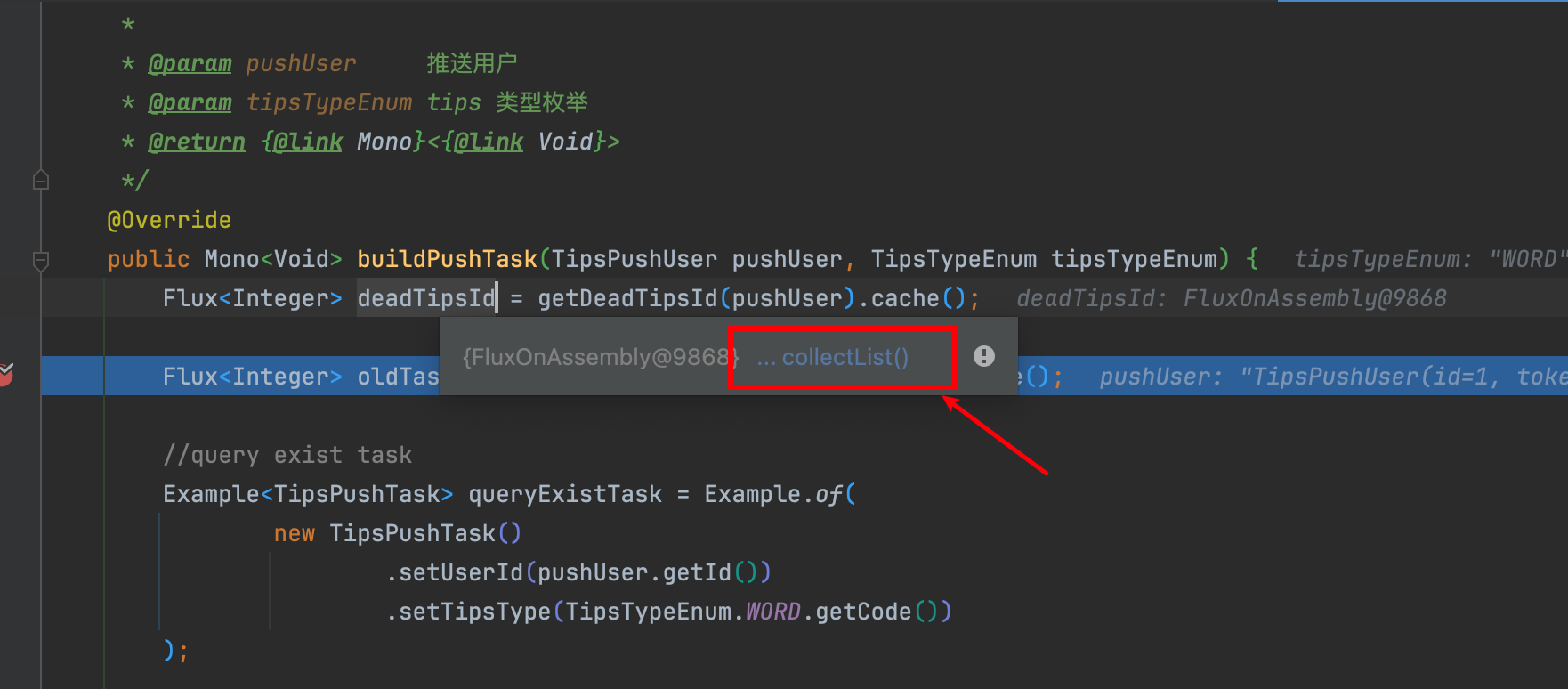
Then you find IDEA stuck and not moving.
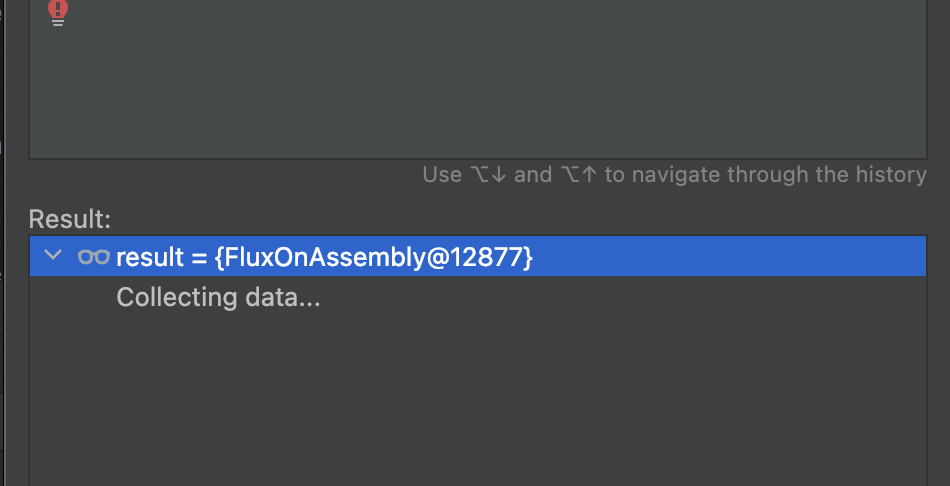
You think it's temporary, but when you come back from the bathroom with a cup of water, it's still stuck - but the database only has 3 records!!
Then smart students will say: just add .block() at the end? Then you'll get this error: block()/blockFirst()/blockLast() are blocking, which is not supported in thread reactor-http-nio-2

This is really torturous when urgently investigating an issue. Better to write xxx.subscribe() below to print it.
But stranger still, sometimes this feature works normally - I don't understand what causes IDEA to malfunction.
4.3 The Confusion of filterWhen
Look at this code - I expect Flux.just(1,2,3,4,5,6) to be filtered by Flux.just(1, 2, 3), outputting when equal elements exist.
val cacheFlux = Flux.just(1, 2, 3).cache()

Flux.just(1,2,3,4,5,6)
    .filterWhen {mainELe ->
        cacheFlux.any {
            mainELe == it
        }
    }
    .doOnNext {
        println(it)
    }
    .subscribe()
Its output matches expectations:
1
2
3
Now let's increase difficulty - if I want to filter out elements NOT equal to Flux.just(1, 2, 3), your instinct might be to change mainELe == it to mainELe != it?
That would be very wrong - you'll find the output is:
1
2
3
4
5
6
Why? Careful analysis reveals:
- The former
cacheFlux.any { mainELe == it }means pass if any element is equal - The latter
cacheFlux.any { mainELe != it }means pass if any element is NOT equal
So when you expect "filter out data equal to cacheFlux", you should negate this result:
    val cacheFlux = Flux.just(1, 2, 3).cache()

    Flux.just(1,2,3,4,5,6)
        .filterWhen {mainELe ->
            cacheFlux.any {
                mainELe == it
            }
            .map {
                it.not()
            }
        }
        .doOnNext {
            println(it)
        }
        .subscribe()
But I found this really counter-intuitive when using it! Because the any operator makes you think one less layer.
4.4 Lost Exception Stack Traces Make Debugging a Guessing Game
For example, in a scenario where you query 3 tables and merge data, then process an attribute after aggregation.
When a query fails, you can't immediately see which method caused the query error because the call stack doesn't print your code's call location at all.
5. Initializing Mono or Flux Doesn't Mean It Actually Executed
When learning project reactor, we all know that if a Mono or Flux isn't subscribed, nothing happens. But in actual debugging, this always confuses us.
Look at this code:
This code first findOne a record by name, if found enters flatMap, updates attributes, then saves.
If no record is found, executes the logic in switchIfEmpty to add a new record.
public Mono<Void> saveClicks(String name) {
    JSONObject dataJson = new JSONObject().put("age", "100");

    return easterEggRepository.findOne(Example.of(new EasterEgg().setName(name)))
            .flatMap(it -> {
                JSONObject dataJsonExist = new JSONObject(it.getData().asString());
                //... update some attributes
                return easterEggRepository.save(it);
            })
            .switchIfEmpty(saveEasterEgg())
            .then()
    ;
}

private Mono<EasterEgg> saveEasterEgg(String name) {
    return easterEggRepository.save(new EasterEgg().setName(name))
            .doOnNext(it -> {
                System.out.println(it);
            })
            ;
}
But when you actually debug through IDE, assuming you set breakpoints on the highlighted lines.
Whether it's an update or add operation, when a request comes in, it will first enter switchIfEmpty, i.e., the saveEasterEgg method, then to the breakpoint in flatMap. You'd naturally think saveEasterEgg was executed first, but it actually wasn't - this is just Flux's initialization process.
How do we know? Because if easterEggRepository.save(new EasterEgg().setName(name)) was executed, the doOnNext below would also execute, but it actually doesn't.
6. Increased Unit Test Coverage Difficulty
Not discussing whether unit tests are useless here. When you want to use unit tests to cover your code, you have to write like this:
@Test
public void testAppendBoomError() {
  Flux<String> source = Flux.just("thing1", "thing2");

  StepVerifier.create(
    appendBoomError(source))
    .expectNext("thing1")
    .expectNext("thing2")
    .expectErrorMessage("boom")
    .verify();
}
Great! Doesn't look troublesome at all compared to previous unit test writing...
7. Over 200 Mono/Flux Operators - Not Easy to Master
For example, a pop quiz:
- What's the use case for
Flux.using? - When should you use
onErrorContinue()? - When you want to use
Backpressure, which operators can you use? - Which operators can you use to calculate the Fibonacci sequence?
These all require developers to constantly read documentation to gradually accumulate corresponding knowledge. So even if you're proficient in Java functional programming, you still have to walk the journey again when seeing so many operators in reactive programming.
8. Want R2DBC AND Database Sharding?
Expecting to implement database sharding while using r2dbc? You might only have akka as an option.
Searched a bunch about: "Does sharding jdbc support r2dbc?", "How to implement database sharding with r2dbc"
The result is:
Under the reactive programming API, ShardingSphere JDBC cannot handle R2DBC DataSource, only JDBC DataSource. Creating ShardingSphere JDBC DataSource should be avoided in Spring Boot microservices using WebFlux components.
The final result found is that database sharding can be implemented through akka: Database sharding
9. Context Issues
Traditional Servlet environments use ThreadLocal, but because WebFlux is non-blocking, asynchronous, and uses an event-driven model, request processing is no longer bound to specific threads.
This means you can no longer rely on ThreadLocal to pass context information - you must use Reactor's Context for explicit context passing.
So when you want to debug context loss issues, it's definitely enough to keep you busy.
-
You might encounter situations where context values suddenly "disappear" or are unexpectedly overwritten, yet it's hard to trace the source.
-
Some third-party libraries or existing code may still rely on ThreadLocal to store user context (like MDC for logging), but in WebFlux, due to the asynchronous non-blocking thread model, ThreadLocal data won't automatically pass through the reactive chain.
-
Using blocking operations (like
block(),blockOptional(),toFuture().get(), etc.) will cause context loss because blocking operations interrupt the reactive chain, the thread model changes, and context cannot be correctly passed.
10. The Dangerous Schedulers.newSingle("add-executor")
Guess where the danger is in this code?
    @GetMapping("addNumbers")
    public Mono<ResponseEntity> addNumbers(){
        return Mono.just(1)
                .flatMap(i ->
                    Mono.fromRunnable(() -> someOperation())
                        .subscribeOn(Schedulers.newSingle("add-executor"))
                )
                .map(it -> {
                    return ResponseEntity.ok().build();
                });
    }
The root of the problem is that Schedulers.newSingle("add-executor") creates a new thread pool and returns a Scheduler object. And every time a request comes in, a new thread pool is created.
This means you won't see any problems locally or in test environments, but when 3000 requests come in production, 3000 threads will be created.
These created threads won't be recycled because .dispose() isn't explicitly called, leading to memory leaks.
11. @PostConstruct Doesn't Seem So Convenient Anymore
Sometimes to quickly verify a piece of code, you add @PostConstruct to a method for verification:
I expect that after adding @PostConstruct, I can start the project to quickly verify the request and save logic, since my method has no parameters and can be executed directly. This is quite convenient when investigating an issue.
    @PostConstruct
    public Mono<Void> requestAndSave() {
        String typeMax = "max";
        return requestContent(typeMax)
                .flatMap(it -> {
                    Entity entity = new Entity().setContent(it)
                            .setType(typeMax)
                            .setUpdateTime(LocalDateTime.now());
                    return xxxRepository.save(entity);
                })
                .then()
                ;
    }
Then you'll find that it doesn't execute at all!!! The reason is simple - you didn't write .subscribe();
You have to change it to this, which is a bit troublesome and annoying.
    @PostConstruct
    public Mono<Void> requestAndSave() {
        String typeMax = "max";
        Mono<Void> result = requestContent(typeMax)
                .flatMap(it -> {
                    Entity entity = new Entity().setContent(it)
                            .setType(typeMax)
                            .setUpdateTime(LocalDateTime.now());
                    return xxxRepository.save(entity);
                })
                .then()
                ;
        result.subscribe();
        return result;
    }
12. Final Thoughts
As of now, I haven't stepped on all the pitfalls in WebFlux, so even with all these issues, writing reactive programming still feels addictive - after all, you won't hit all the pitfalls mentioned above at once.
You could also say I have a strange hammer in my hand, so everything looks like a nail to hit.
In some scenarios, it makes me feel like I've saved a lot of code, for example:
12.1 Fault Tolerance and Retry Mechanism
Retrying requests only needs .retry, like this: retry 3 times with 2 seconds interval between retries.
WebClient webClient = WebClient.create("https://example.com");

webClient.get()
        .uri("/resource")
        .retrieve()
        .bodyToMono(String.class)
        .retryWhen(Retry.fixedDelay(3, Duration.ofSeconds(2)))
        .onErrorResume(e -> {
            System.out.println("Request failed after retries: " + e.getMessage());
            return Mono.empty();
        })
        .subscribe(response -> System.out.println("Response: " + response));
You can also use exponential backoff: Retry.backoff(3, Duration.ofSeconds(1)), where retry intervals grow exponentially.
12.2 Backpressure Support
For example:
- Producer generates a data item every 100 milliseconds.
- Consumer takes 500 milliseconds to process data.
Through backpressure mechanism, consumers can control data acquisition speed based on their processing capacity, avoiding overload.