Ehcache Tiering Options
Ehcache supports the concept of tiered caching. This section covers the different available configuration options. It also explains rules and best practices to maximize the benefits of tiered caching.
For a general overview of available storage tiers, see the section on Storage Tiers.
1. Moving Out of Heap
When you have tiers other than the heap tier in your cache, several things happen:
- Adding a mapping to the cache means the key and value must be serialized.
- Reading a mapping from the cache means the key and value may need to be deserialized.
With these two points, you need to recognize that the binary representation of data and how it converts to and from serial data will play an important role in cache performance. Make sure you understand the options available for serializers (see the "Serializers" section). Also, this means some configurations, while making sense on paper, may not provide optimal performance based on your application's actual usage.
2. Single Tier Setup
All tiering options can be used individually. For example, you can have cache data only in off-heap or only in a cluster. The following are valid configurations:
- heap
- offheap
- disk
- clustered
To do this, simply define a single resource in the cache configuration:
// First define key and value types in the configuration builder.
CacheConfigurationBuilder.newCacheConfigurationBuilder(Long.class, String.class,
	// Then specify the resource (tier) to use. Here we only use off-heap resource.
  ResourcePoolsBuilder.newResourcePoolsBuilder().offheap(2, MemoryUnit.GB)).build();
2.1 Heap Tier
Since no serialization is required, it's also faster as the starting point for each cache. You can choose to pass keys and values by value (see "Serializers and Copiers" section), with the default being by reference. The heap tier can be sized by entries or by size.
// Only allow 10 entries on heap. Will overflow when full.
ResourcePoolsBuilder.newResourcePoolsBuilder().heap(10, EntryUnit.ENTRIES);
// or shortcut for specifying 10 entries.
ResourcePoolsBuilder.heap(10);
// or only allow 10 MB. Will evict when full.
ResourcePoolsBuilder.newResourcePoolsBuilder().heap(10, MemoryUnit.MB);
2.1.1 Byte-Sized Heap
For every tier except the heap tier, calculating cache size is very easy. You more or less sum the sizes of all byte buffers containing serialized entries. When heap is limited by size rather than entries, it's slightly more complex.
The impact of byte sizing on runtime performance depends on the size and graph complexity of cached data.
CacheConfiguration<Long, String> usesConfiguredInCacheConfig = CacheConfigurationBuilder.newCacheConfigurationBuilder(Long.class, String.class,
  ResourcePoolsBuilder.newResourcePoolsBuilder()
  // This limits the amount of memory the heap tier uses to store key-value pairs. Object sizing has a cost.
    .heap(10, MemoryUnit.KB)
    // These settings are only used by the heap tier. So off-heap won't use them at all.
    .offheap(10, MemoryUnit.MB))
  .withSizeOfMaxObjectGraph(1000)
  // Sizing can also be further limited by 2 other configuration settings: the first specifies the maximum number of objects to traverse when moving through the object graph (default: 1000),
  // the second defines the maximum size of a single object (default: Long.MAX_VALUE, so almost infinite).
  // If sizing exceeds either of these limits, the entry won't be stored in the cache.
  .withSizeOfMaxObjectSize(1000, MemoryUnit.B)
  .build();

CacheConfiguration<Long, String> usesDefaultSizeOfEngineConfig = CacheConfigurationBuilder.newCacheConfigurationBuilder(Long.class, String.class,
  ResourcePoolsBuilder.newResourcePoolsBuilder()
    .heap(10, MemoryUnit.KB))
  .build();

CacheManager cacheManager = CacheManagerBuilder.newCacheManagerBuilder()
  .withDefaultSizeOfMaxObjectSize(500, MemoryUnit.B)
  // Unless explicitly defined, default configuration can be provided at CacheManager level for caches to use.
  .withDefaultSizeOfMaxObjectGraph(2000)
  .withCache("usesConfiguredInCache", usesConfiguredInCacheConfig)
  .withCache("usesDefaultSizeOfEngine", usesDefaultSizeOfEngineConfig)
  .build(true);
2.1.2 Off-Heap Tier
If you want to use off-heap resources, you must define a resource pool and provide the memory size to allocate.
// Only 10 MB allowed off-heap. Will evict when full.
ResourcePoolsBuilder.newResourcePoolsBuilder().offheap(10, MemoryUnit.MB);
The above example allocates a very small amount of off-heap resources. Typically, you'll use larger amounts.
Remember that off-heap stored data must be serialized and deserialized - so it's slower than heap. Therefore, you should prefer off-heap for large amounts of data, as on-heap data would have too much impact on garbage collection. Don't forget to define the -XX:MaxDirectMemorySize option in java options based on the off-heap size you want to use.
2.1.3 Disk Tier
For the disk tier, data is stored on disk. The faster and more dedicated the disk, the faster data access will be.
// Get a PersistentCacheManager, which is a normal CacheManager but with the ability to destroy caches.
PersistentCacheManager persistentCacheManager = CacheManagerBuilder.newCacheManagerBuilder()
// Provide the location where data should be stored.
  .with(CacheManagerBuilder.persistence(new File(getStoragePath(), "myData")))
// Define the disk resource pool to be used by the cache. The third parameter is a boolean to set whether the disk pool is persistent. When set to true, the pool is persistent. When using the two-parameter version disk(long, MemoryUnit), the pool is not persistent.
  .withCache("persistent-cache", CacheConfigurationBuilder.newCacheConfigurationBuilder(Long.class, String.class,
    ResourcePoolsBuilder.newResourcePoolsBuilder().disk(10, MemoryUnit.MB, true))
  )
  .build(true);

persistentCacheManager.close();
The above example allocates a very small amount of disk storage. Typically, you'll use larger storage. Persistence means the cache will survive JVM restarts. After restarting the JVM and creating a CacheManager with disk persistence at the same location, everything in the cache still exists.
The disk tier cannot be shared between cache managers. The persistence directory is dedicated to one cache manager at a time.
Remember that data stored on disk must be serialized/deserialized before writing to/reading from disk - so it's slower than heap and off-heap. Therefore, disk storage is interesting when:
- You have large amounts of data that can't fit elsewhere
- Your disk is much faster than the storage it's caching
- You're interested in persistence
Ehcache 3 only provides persistence on clean shutdown (calling close()). If the JVM crashes, data integrity is not guaranteed. After restart, Ehcache detects that the CacheManager wasn't cleanly closed and will wipe the disk storage before using it.
Segments
Disk storage is divided into multiple segments that provide concurrent access but also keep open file pointers. The default is 16. In some cases, you may want to reduce concurrency and save resources by reducing the number of segments.
String storagePath = getStoragePath();
PersistentCacheManager persistentCacheManager = CacheManagerBuilder.newCacheManagerBuilder()
  .with(CacheManagerBuilder.persistence(new File(storagePath, "myData")))
  .withCache("less-segments",
    CacheConfigurationBuilder.newCacheConfigurationBuilder(Long.class, String.class,
      ResourcePoolsBuilder.newResourcePoolsBuilder().disk(10, MemoryUnit.MB))
// Define an OffHeapDiskStoreConfiguration instance to specify the desired number of segments.
    .withService(new OffHeapDiskStoreConfiguration(2))
  )
  .build(true);

persistentCacheManager.close();
2.1.4 Clustered
The clustered tier means the client is connecting to a Terracotta server array that stores cache data. This is also a way to share caches between JVMs. For details on using the clustered tier, see the "Clustered Cache" section.
3. Multi-Tier Setup
If you want to use multiple tiers, you must follow some constraints:
-
- A heap tier must always be present in a multi-tier setup.
-
- You cannot combine disk tier and clustered tier.
-
- Tier sizes should be pyramid-shaped, meaning higher tiers are configured to use less memory than lower tiers.
For 1, this is a limitation of the current implementation.
For 2, this limitation is necessary because having two tiers whose content can outlive a single JVM could cause consistency issues on restart.
For 3, the idea is that tiers are related to each other. The fastest tier (heap tier) is at the top, while slower tiers are below. Typically, heap is more limited than total machine memory, off-heap is more limited than disk or cluster available memory. This leads to the typical pyramid shape of multi-tier setups.
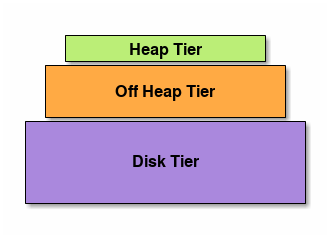
Figure 1. Tier Hierarchy Ehcache requires the heap tier to be smaller than the off-heap tier, and the off-heap tier to be smaller than the disk tier. Although Ehcache cannot verify at configuration time that a count-based heap size will be smaller than another tier's byte-based size, you should ensure this is true during testing.
Considering the above, the following are valid configurations:
- heap + offheap
- heap + offheap + disk
- heap + offheap + clustered
- heap + disk
- heap + clustered
Here's an example using heap, off-heap, and clustered:
PersistentCacheManager persistentCacheManager = CacheManagerBuilder.newCacheManagerBuilder()
// Cluster-specific information telling how to connect to the Terracotta cluster
  .with(cluster(CLUSTER_URI).autoCreate(c -> c))
  .withCache("threeTierCache",
    CacheConfigurationBuilder.newCacheConfigurationBuilder(Long.class, String.class,
      ResourcePoolsBuilder.newResourcePoolsBuilder()
// Define heap tier, the smallest but fastest cache tier.
        .heap(10, EntryUnit.ENTRIES)
// Define off-heap tier. Next in the cache tier hierarchy.
        .offheap(1, MemoryUnit.MB)
// Define clustered tier. The authoritative tier for this cache.
        .with(ClusteredResourcePoolBuilder.clusteredDedicated("primary-server-resource", 2, MemoryUnit.MB))
    )
  ).build(true);
4. Resource Pools
Tiers are configured using resource pools. Most of the time ResourcePoolsBuilder is used. Let's review the previously used example:
PersistentCacheManager persistentCacheManager = CacheManagerBuilder.newCacheManagerBuilder()
  .with(CacheManagerBuilder.persistence(new File(getStoragePath(), "myData")))
  .withCache("threeTieredCache",
    CacheConfigurationBuilder.newCacheConfigurationBuilder(Long.class, String.class,
      ResourcePoolsBuilder.newResourcePoolsBuilder()
        .heap(10, EntryUnit.ENTRIES)
        .offheap(1, MemoryUnit.MB)
        .disk(20, MemoryUnit.MB, true)
    )
  ).build(true);
This is a cache using 3 tiers (heap, off-heap, disk). They are created and chained using ResourcePoolsBuilder. Declaration order doesn't matter (e.g., offheap can be declared before heap) because each tier has a height. The higher the tier's height, the closer it is to the client.
It's very important to understand that resource pools only specify configuration. They are not actual pools that can be shared between caches. For example, consider the following code:
ResourcePools pool = ResourcePoolsBuilder.heap(10).build();

CacheManager cacheManager = CacheManagerBuilder.newCacheManagerBuilder()
  .withCache("test-cache1", CacheConfigurationBuilder.newCacheConfigurationBuilder(Integer.class, String.class, pool))
  .withCache("test-cache2", CacheConfigurationBuilder.newCacheConfigurationBuilder(Integer.class, String.class, pool))
  .build(true);
You'll get two caches, each capable of holding 10 entries. There's no shared pool of 10 entries. Pools are never shared between caches. The exception is clustered caches, which can be shared or dedicated.
4.1 Updating Resource Pools
Limited resizing can be performed on a live cache. updateResourcePools() only allows you to change heap tier size, not pool type. So you cannot change off-heap or disk tier sizes.
Updated to http://www.ehcache.org/documentation/3.8/tiering.html#Resource+pools